Big Move Algo vs. Other Signal Tools: bigmove.agency Alternatives

A quick clarification first: Big Move Algo is not bigmove.agency, and it is not bigmoveproperties.com. We make a TradingView indicator that gives Long, Short and Exit signals. We are not a marketing agency or a real estate company. If you want a marketing agency, the pages ranking for this search cover that, and this one will not help. If you arrived while looking for a trading tool with a similar name, or you want to see how a signal indicator compares with the other ways traders get signals, keep reading.
This guide compares the main kinds of trading signal tools a U.S. retail trader can use, where Big Move Algo fits, and what to verify before you pay for any of them.
TL;DR
- Big Move Algo is a TradingView indicator with AUTO and Manual modes, a Fake Trend Detector and Long, Short and Exit signals. Plans run from $55 per month.
- The real alternatives fall into four groups: TradingView’s built-in indicators, third-party indicator suites, scanners and idea engines, and automation or execution tools.
- Choose by workflow: do you chart inside TradingView, scan for stocks, or want orders sent to a broker automatically?
- No indicator removes risk. The SEC warns that buy and sell signals can prompt impulsive decisions.
- Check pricing pages, trial terms and any performance claims yourself before you subscribe.
Table of Contents
- Who this comparison is for
- The four kinds of alternatives
- How the options compare
- Where Big Move Algo fits
- Perspective: why we built for clarity
- What to verify before you subscribe to any tool
- Risks of trading on signals
- Which option should you pick?
- Try Big Move Algo
- FAQ
- Sources
Who this comparison is for
The name “Big Move” is shared by several unrelated businesses, which is why searches like this one mix up agencies, property sites and trading software. The comparison below is for one reader: a retail trader, probably in the U.S., who trades crypto, forex, stocks, indices or commodities and wants clearer entries and exits than a blank chart gives.
If that is you, the question is not “which brand” but “which type of tool matches how I trade.” Signal tools differ in four ways that matter day to day:
- Where they run. Inside TradingView, in a separate app, or in a broker platform.
- What they output. A chart marker, a scanner list, an alert, or an actual order.
- How much setup they need. Some work out of the box, others reward hours of tuning.
- What they filter out. A signal is only as useful as the conditions it refuses to trade.
The four kinds of alternatives
1. TradingView’s built-in indicators
The cheapest starting point is the library already inside TradingView: moving averages, RSI, MACD, Supertrend-style tools and community scripts. They cost nothing beyond your TradingView plan, and they teach you how signals behave.
The trade-off is that you assemble the system yourself. You choose the indicators, the settings, the timeframe and the rules for when to ignore a signal. Beginners often stack five oscillators that all say the same thing and call it confirmation. We cover how these tools are grouped in our TradingView indicator categories guide, which is a useful map before you buy anything.
Best for: traders who enjoy building and testing their own rules.
2. Third-party indicator suites
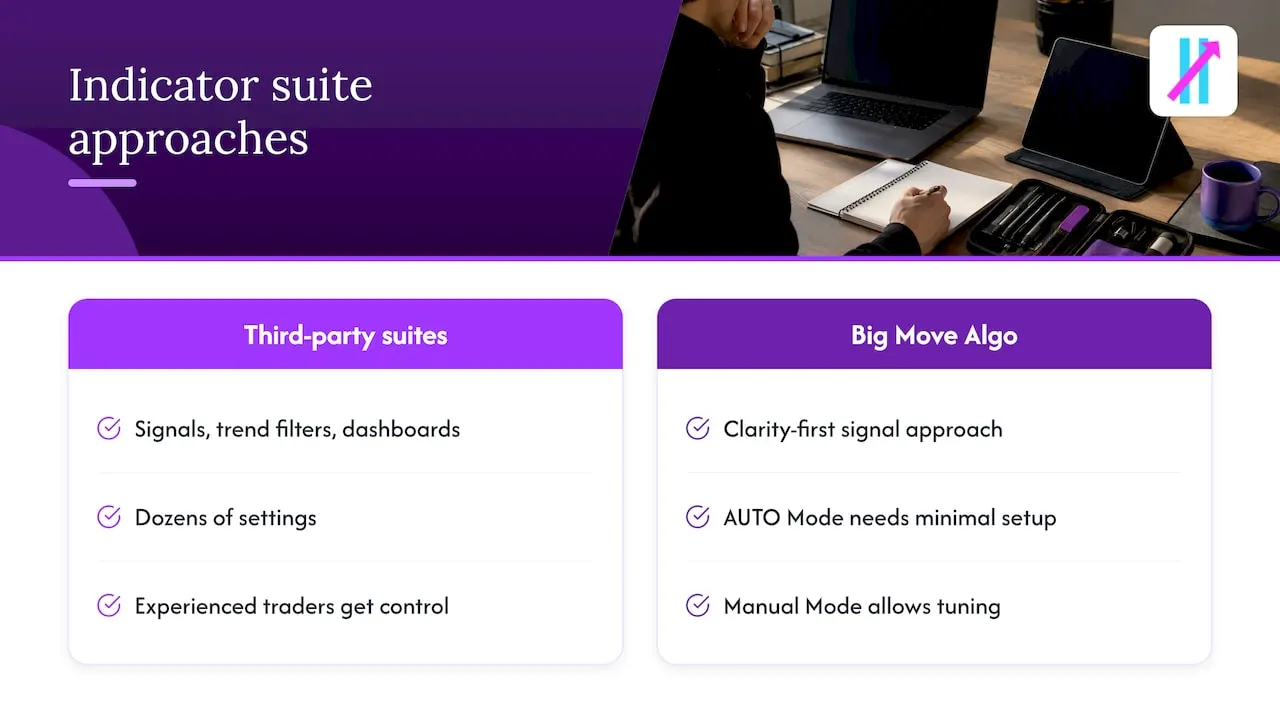
This is the group Big Move Algo belongs to. Paid indicator suites such as LuxAlgo and similar packages sit on top of TradingView and add signals, trend filters and dashboards. They differ mainly in how many modules they bundle and how much you configure.
Some offer a large toolkit with dozens of settings. That suits an experienced trader who wants control, but it can overwhelm someone who just wants to know whether to be long, short or flat. Big Move Algo takes the opposite approach: clarity first. AUTO Mode needs minimal setup, and Manual Mode is there when you want to tune it.
Best for: traders who already chart in TradingView and want structured signals on top of it.
3. Scanners and idea engines
Tools such as Trade Ideas and TrendSpider approach the problem differently. Instead of marking entries on one chart, they scan many symbols and surface candidates, or automate technical analysis across a watchlist. They are strongest for U.S. stock day traders who need to find what is moving before they decide what to trade.
They are generally separate platforms rather than TradingView indicators, so you learn another interface. If you want to see how we think about that category, our guide to Trade-Ideas alternatives lays it out.
Best for: stock traders whose main problem is finding setups, not timing them.
4. Automation and execution tools
A third problem is acting on a signal fast enough and without hesitation. Services like TradersPost connect TradingView alerts to brokers so orders can be placed automatically. They do not generate signals themselves; they carry them out.
This pairs naturally with an indicator, since any indicator that fires TradingView alerts can feed one. Big Move Algo sends alerts to multiple platforms and supports integration with automated trading platforms. Our piece on TradingView signal indicators as TradersPost alternatives goes through that pairing.
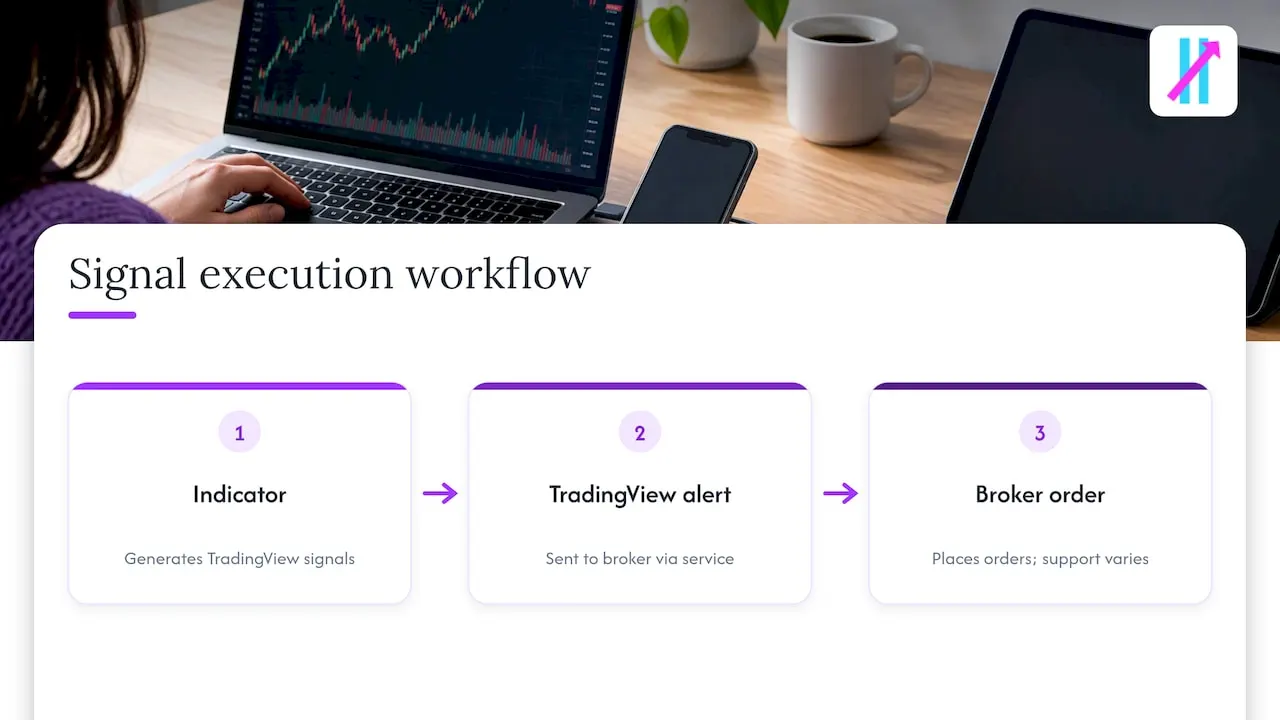
One practical point for U.S. traders: broker support matters. For example, TradeStation integrates with TradingView for U.S. stocks, ETFs, futures and single-leg equity options, subject to account approval and permissions. Confirm what your own broker allows before building a workflow around it.
Best for: traders who already trust their signal and want to remove manual clicking.
How the options compare
We have not listed competitor prices here, because they change and each provider publishes its own. Check the current pricing page of any tool you shortlist.
| Criterion | TradingView built-ins | Indicator suites (e.g. LuxAlgo, Big Move Algo) | Scanners (e.g. Trade Ideas, TrendSpider) | Automation (e.g. TradersPost) |
|---|---|---|---|---|
| Runs inside TradingView | Yes | Yes | Usually separate platform | Connects to TradingView alerts |
| Main output | Raw indicator lines | Chart signals and alerts | Ranked candidates and alerts | Orders sent to a broker |
| Setup effort | High, you build the rules | Low to moderate | Moderate, new interface | Moderate, broker linking |
| Generates entries and exits | No | Yes | Partly | No |
| Best market fit | Any | Crypto, forex, stocks, indices, commodities | Mostly U.S. equities | Depends on broker |
Where Big Move Algo fits
Here is what you get with Big Move Algo, taken from what we publish on our site:
- Long, Short and Exit signals on the chart, so each signal has a clear action attached.
- AUTO Mode for a fast start with minimal setup, and Manual Mode for more customization.
- Fake Trend Detector, which flags low-quality or misleading market conditions where trading may not be recommended.
- Multi-market coverage: crypto, forex, stocks, indices and commodities.
- No repainting, unlimited devices, alerts to multiple platforms, integration with automated trading platforms, and free updates.
- Instant access after purchase, with payment through Stripe.
The feature we would point a beginner to first is the Fake Trend Detector. Much of the damage retail traders do comes from trading choppy, directionless conditions. A tool that tells you when to stand aside is worth as much as one that tells you when to enter.
Plans and prices
Prices below are as published on our site.
| Plan | Monthly | Annual |
|---|---|---|
| Version 2 | $55 | $660 |
| Version 3 | $64 | $768 |
| Version 3 Plus | $79 | $948 |
Annual billing works out to the same as twelve monthly payments on each plan, so choose by how long you plan to use it, not by a discount. See the plan details on the Big Move Algo site.
Perspective: why we built for clarity
Most traders we hear from do not lack information. They have too much of it. Six indicators, three timeframes, a Discord full of opinions, and still no clear answer to a simple question: is this a trade or not?
We built Big Move Algo around that gap. A signal should be readable in seconds, and a good tool should be willing to say “not now.” That is the reason for the Fake Trend Detector, and the reason AUTO Mode exists: a trader should be able to start without a weekend of configuration. Experienced traders still get Manual Mode, because simplicity should not mean a ceiling.
We are also direct about limits. An indicator is a decision aid. It does not know your risk tolerance, your account size or your emotions at 3 p.m. when a trade goes red. The tool structures the decision, and you still own the position size and the stop.
— Steven Hartwell
What to verify before you subscribe to any tool
This applies to us as much as to anyone we compare against.
Trials, billing and cancellation
Read the checkout page and terms for the billing period, whether the plan renews automatically and how to cancel. Confirm which plan includes which features, since tiers often differ by more than the name suggests.
Performance claims
Be skeptical of any win rate quoted without a time period, market, timeframe and sample size. Ask whether results come from live trading or a backtest, and whether fees and slippage are included. Check also whether the indicator repaints, meaning past signals change after the fact, which makes historical charts look better than real-time use would have been. You can test this yourself by watching signals form live on a replay or demo chart.
Compatibility
Confirm the tool supports your markets, your TradingView plan and your broker. Crypto, forex and equities behave differently, and automation support varies by broker.
Your own testing
Paper trade first. Run any tool through at least a few weeks of live conditions, including a choppy stretch, before putting real size behind it.
Risks of trading on signals
No comparison is honest without this section. The SEC has warned that tools producing buy and sell indications can prompt impulsive decisions and that the underlying information may be inaccurate, incomplete, misleading or stale. It advises investors not to rely solely on such tools and to review public company information and compare performance against major indices.
That bulletin addresses social sentiment tools specifically, but the lesson carries over to any signal service: a prompt to buy or sell is not a reason to skip your own judgment. The SEC has also noted that momentum-based trading carries high risk for retail investors if a trend fails to continue. Most trend-following signals are exactly that kind of bet.
Practical habits that follow from this:
- Decide position size and stop level before you enter, never after.
- Treat a signal as one input, not an instruction.
- Do not risk money you cannot afford to lose. If you are unsure whether active trading suits your finances, speak with a registered financial adviser.
- Avoid chasing a missed signal late.
Big Move Algo does not guarantee profits, and nothing in this article should be read as a promise of returns.
Which option should you pick?
Use the workflow you actually have:
- You chart in TradingView and want clear entries and exits: an indicator suite. Big Move Algo is built for this, especially if you want low setup and a filter for weak conditions.
- You like to build your own rules: start with TradingView’s built-in indicators and learn what each one does.
- You trade U.S. stocks and your problem is finding candidates: a scanner platform.
- You already have a tested signal and want hands-off execution: an automation service connected to your broker, fed by TradingView alerts.
Many traders combine two layers: an indicator for signals and an automation tool for execution.
Try Big Move Algo
If the indicator route fits, Big Move Algo is a straightforward place to start. AUTO Mode gets you running quickly, the Fake Trend Detector helps you avoid poor conditions, and access is instant after purchase. Plans start at $55 per month for Version 2, with Version 3 at $64 per month and Version 3 Plus at $79 per month.
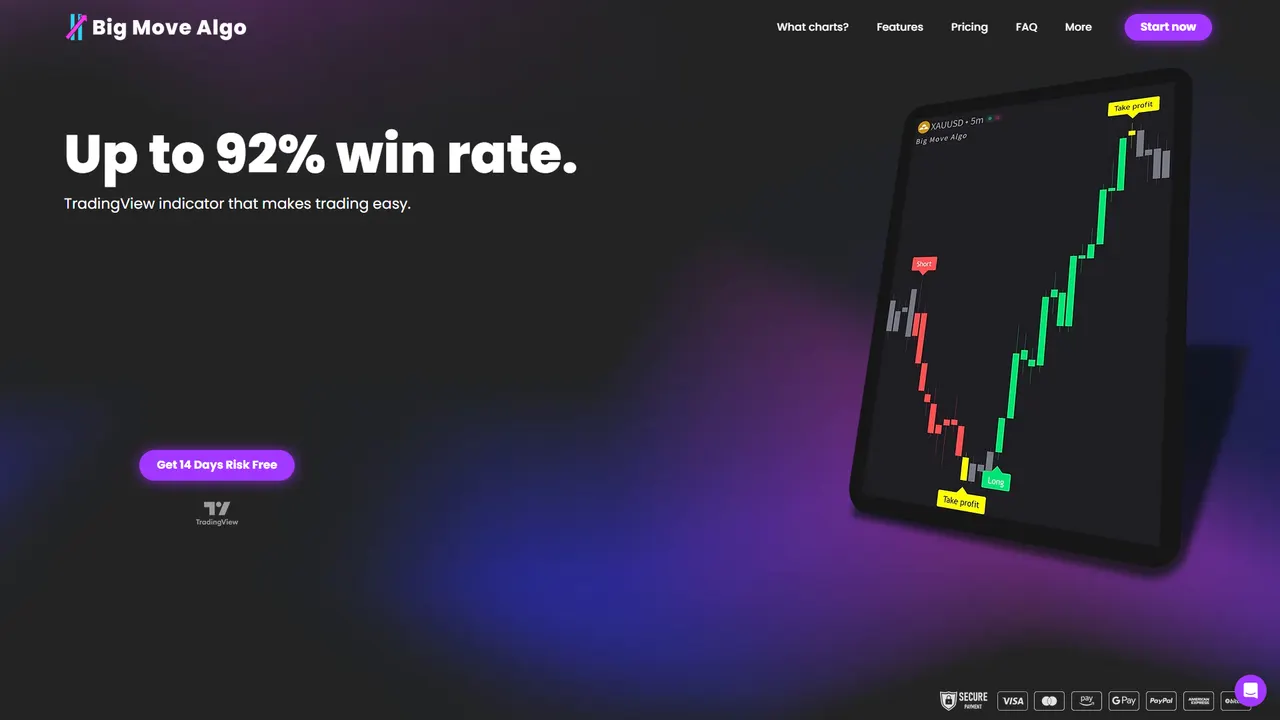
Compare the plans and subscribe on the Big Move Algo plans page. You can also read how we compare with other tools in our guides to EliteSignals alternatives and SharkSignals alternatives.
FAQ
Is Big Move Algo the same company as bigmove.agency?
No. Big Move Algo is a financial technology company that makes a TradingView indicator for retail traders. We have no connection to bigmove.agency or bigmoveproperties.com, which are separate businesses in other industries.
Do I need a TradingView account to use Big Move Algo?
Yes. Big Move Algo is a TradingView indicator, so you use it on TradingView charts. If you do not use TradingView, it is not the right fit, and a scanner or broker-native platform may suit you better.
Can a signal indicator guarantee profits?
No. Indicators structure decisions but cannot remove market risk. The SEC warns that buy and sell prompts can lead to impulsive trading, so combine any signal with a risk plan, position sizing and your own judgment.
Which markets does Big Move Algo cover?
It works across crypto, forex, stocks, indices and commodities. Whether you can trade a given market through automation depends on your broker, so check its TradingView support separately.
Should I choose monthly or annual billing?
Monthly billing suits a first trial of the tool. The annual price on each plan equals twelve monthly payments, so choose annual only when you are sure you will keep using it.
Sources
- Investor Bulletin: Social Sentiment Investing Tools, SEC Office of Investor Education and Advocacy
- Investor Alert: Thinking About Investing in the Latest Hot Stock, SEC
- TradingView Trading Platform, TradeStation