Signal Settings: Retail Traders Should Test Beyond Backtests
Optimize your indicator settings for robustness, not peak backtest returns. Keep the search narrow, price in realistic costs, and prove the result on data the settings have never seen, then forward test before real money is involved. If you want the lowest-friction start, our AUTO Mode in Big Move Algo offers minimal setup.
TL;DR:
- Keep monthly turnover below roughly 50% where possible; commissions, spreads, and slippage can erase apparent profits from frequent signals in live trading.
- Limit testing to two or three parameters with three to five values each, record every variation, and reject settings that barely beat defaults.
- Use separate holdout and walk forward data, then paper trade frozen settings for several months; never retune after seeing validation results.
- Beginners should start with AUTO Mode; experienced traders should use Manual Mode only with a written rationale, documented changes, and forward testing.
Table of Contents
- Why does naive signal settings optimization fail?
- What principles keep signal settings robust?
- What is a step-by-step workflow for tuning signal settings?
- How do you test for overfitting and simulate live trading?
- When should you use AUTO Mode and when should you use Manual Mode?
- How do you monitor live performance without over-tweaking?
- What do sensitivity, thresholds, and filters actually do?
- How do you choose an optimization objective for your trading style?
- How does the Fake Trend Detector fit into optimization?
- What common pitfalls affect Big Move Algo signal settings?
- A note from our author on why clarity beats cleverness
- Why Big Move Algo fits this approach
- FAQ
- Sources
Why does naive signal settings optimization fail?
Most failed optimizations share one cause: the trader kept adjusting until the history looked perfect. Oxford Academic research describes this as backtest overfitting, a selection bias where a model targets random noise in a limited in-sample dataset and then performs erratically out of sample. Changing a moving average period by one bar at a time until the equity curve looks smooth is the classic example.
Trading frequency is another trap. Research published in the Review of Financial Studies finds that strategies with turnover under about 50% per month are more likely to produce significant returns after costs, while heavier turnover often lets commissions and spreads erase the theoretical profit. Settings that fire constantly can look brilliant on paper and bleed in practice.
Marketing is another trap. The SEC warns that claims of extraordinarily high profits are frequently associated with fraudulent or misleading materials, and it urges investors to verify performance independently. A screenshot of a perfect backtest proves very little.
What principles keep signal settings robust?
Think of tuning as a way to remove obvious mismatches, not to find a magic number. A handful of habits does most of the work:
- Prefer simplicity. Practitioner research recommends favoring simple parameter sets over complex “optimal” ones, because the odds of discovering a persistent edge in competitive markets are low.
- Constrain the search. Set narrow ranges and cap how many variations you will try before you start.
- Price in real costs. Include commissions, spreads, and slippage during optimization, not afterward. Stricter entry and exit rules and lower turnover are effective cost-mitigation techniques.
- Scale for volatility. Technical-trading-rule research notes that scaling position size by volatility can stabilize behavior across regimes.
- Be willing to throw results away. A setting that only works in one narrow window is a coincidence, not an edge.
Pro Tip: Write down the number of settings combinations you plan to test before you run the first one. Every extra variation raises the odds that your “best” result is luck.
What is a step-by-step workflow for tuning signal settings?
Here is a process you can apply today without a coding background. If you want a deeper look at the testing side, our forward testing guide walks through it on TradingView.
- Define your objectives. Decide how many signals you can act on, the drawdown you can stomach, and a turnover ceiling. Put the targets in writing.
- Choose a conservative baseline. Start with default or round-number settings and record them exactly. This is your benchmark, and any tuned version must beat it clearly.
- Design a small parameter grid. Pick two or three parameters and three to five values each. Avoid sweeping dozens of variations.
- Backtest with realistic costs, then validate. Apply commissions, spreads, and slippage. Then run out-of-sample and walk-forward tests on data you did not use to choose settings.
- Forward test for several months. Paper trade the frozen settings and change them only if you find a systematic issue, such as bad data or a clear execution problem.
A few rules keep each step honest:
- Never adjust settings after seeing an out-of-sample result and then call it out-of-sample again.
- Keep a log of every variation you tried, including the ones you discarded.
- If the tuned version barely beats your baseline, keep the baseline.
How do you test for overfitting and simulate live trading?
Start with split-sample testing: an in-sample period for building, a holdout period for checking, and walk-forward windows that repeat the process through time. If performance collapses outside the sample, the settings fit noise. Our backtest pitfalls checklist covers the common mistakes in detail.
Then correct for how many things you tried. Academic analysis of backtest overfitting introduces the deflated Sharpe concept, which adjusts an apparent Sharpe ratio for multiple trials and data snooping. The more variations you tested, the less a high Sharpe ratio means.
- Model turnover and costs, and aim to stay under the roughly 50% monthly turnover range where possible.
- Paper trade in real time and require a minimum observation period of several months before going live.
- Ask for a complete track record before trusting anyone else’s optimized settings.
Multiple trials and data snooping can greatly exaggerate apparent strategy performance, which is why the deflated Sharpe adjustment exists. Treat any impressive backtest number as a hypothesis to test, not a result to trade.
When should you use AUTO Mode and when should you use Manual Mode?
Presets are best described by intent. A trend preset favors fewer, longer-lasting signals and tolerates slower entries. A swing preset accepts moderate signal frequency for shorter holding periods. An intraday preset produces more signals, which raises the cost burden, so it demands the strictest cost modeling. None of these is a promise of results, only a statement of what each is designed to do.
- AUTO Mode suits beginners and anyone who wants fewer parameters to manage and a faster start. It follows the simplicity rule: less to tweak means less to overfit.
- Manual Mode suits experienced traders who will document every change and validate it with forward testing. Our guide to customizing TradingView chart signals shows how to approach it.
- Signal clarity matters in both. See how to get clear Long and Short signals before choosing.
If you are unsure, begin in AUTO Mode and move to Manual only after you have a written reason and a test plan.
How do you monitor live performance without over-tweaking?
Monitoring should be boring and scheduled. Reacting to every losing streak is just re-optimization on short-term noise.
- Weekly: check signal rate, obvious slippage, and data or alert issues. Our checklist to verify a signal before entering a trade fits this routine.
- Monthly: compare profit and loss to expectations, check turnover against your plan, and look for regime shifts.
- Quarterly: review parameters against strict written criteria, and record any change in a log.
Pro Tip: Limit the number of parameters you allow yourself to touch, and treat every change as an experiment with a start date and an end date.
What do sensitivity, thresholds, and filters actually do?
Most signal settings fall into broad families, and knowing which family a parameter belongs to tells you what it can and cannot fix.
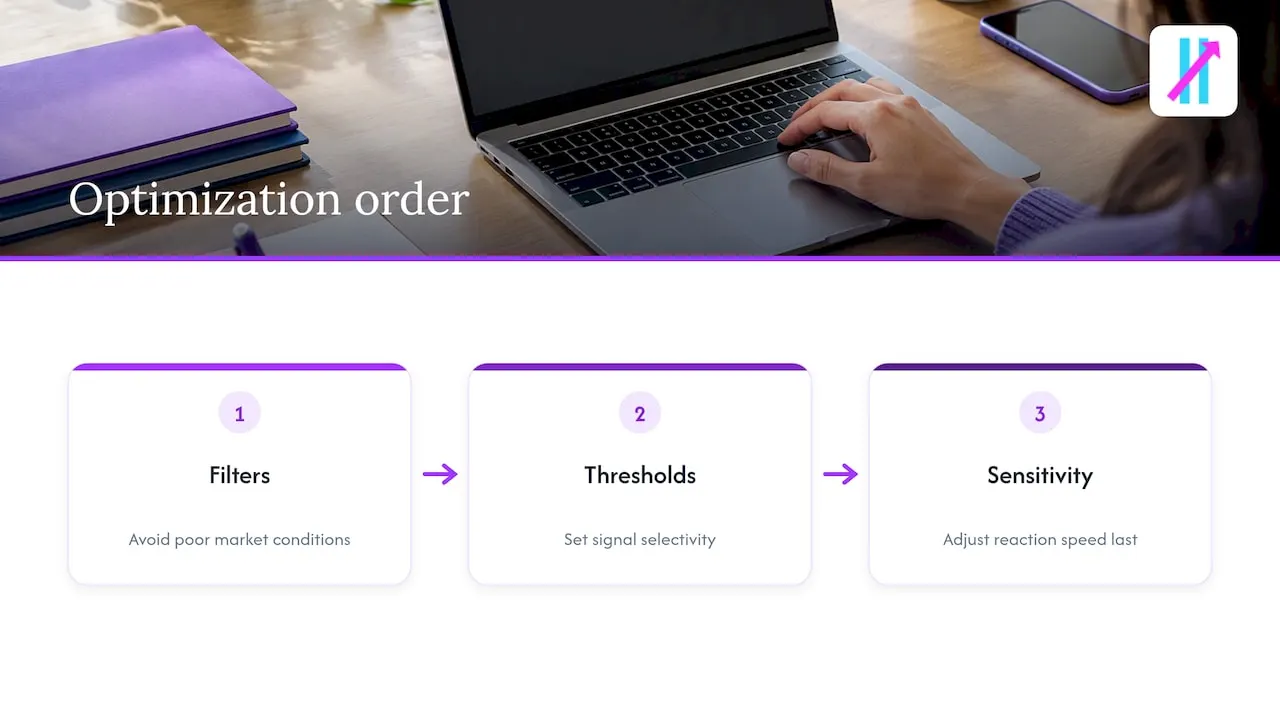
Sensitivity parameters control how quickly an indicator reacts to price. A faster setting catches turns sooner but produces more false starts and more trades, which feeds the turnover problem. A slower setting filters noise but enters late and gives back part of the move. Neither is correct in general. The right answer depends on how often you can act and what each trade costs.
Threshold parameters set the line a reading must cross before a signal fires. Tighter thresholds mean fewer, more selective signals. Looser thresholds mean more signals of lower average quality. Moving a threshold by a tiny increment rarely changes the real edge, but it can dramatically change a backtest, which makes thresholds the most common place for accidental overfitting.
Filter parameters decide when signals are ignored. Trend, volatility, and session filters remove conditions where the logic tends to perform poorly. Filters are valuable because they reduce trades without touching the core signal, but each added filter is another knob to overfit.
A practical rule: change one family at a time, and change sensitivity last. Start by deciding which market conditions you want to avoid, then set thresholds, and only then adjust speed.
How do you choose an optimization objective for your trading style?
The objective you optimize quietly shapes the settings you get. Maximizing raw return rewards risky, high-turnover settings.
Match the objective to your situation:
- Capital preservation focus: minimize maximum drawdown, and accept lower returns in exchange for survivability.
- Steady-growth focus: favor a risk-adjusted measure, then deflate it for the number of variations you tried.
- Short-term, active style: put cost-adjusted return first, since turnover is your biggest enemy.
- Part-time trader: optimize for fewer signals you can act on without watching the screen.
Whatever you choose, set it before you test, not after. Picking the objective that flatters the winning settings is the same overfitting problem in disguise. And remember that no objective compensates for skipping out-of-sample validation. It only decides which trade-offs you are willing to make.
How does the Fake Trend Detector fit into optimization?
Our Fake Trend Detector flags low-quality or misleading market conditions where trading may not be recommended. That matters for tuning because many “bad settings” are really good settings applied in conditions where no setting works well. If a choppy, directionless period drags down your backtest, you may be tempted to loosen thresholds or speed up sensitivity to compensate, which is exactly how overfitting starts.
A cleaner approach is to let the filter handle the conditions problem and keep the core signal settings simple. When you review results, split them into periods the detector allowed and periods it flagged. If performance in the allowed periods holds up across your out-of-sample and walk-forward windows, you have evidence the filter is doing real work rather than curve-fitting.
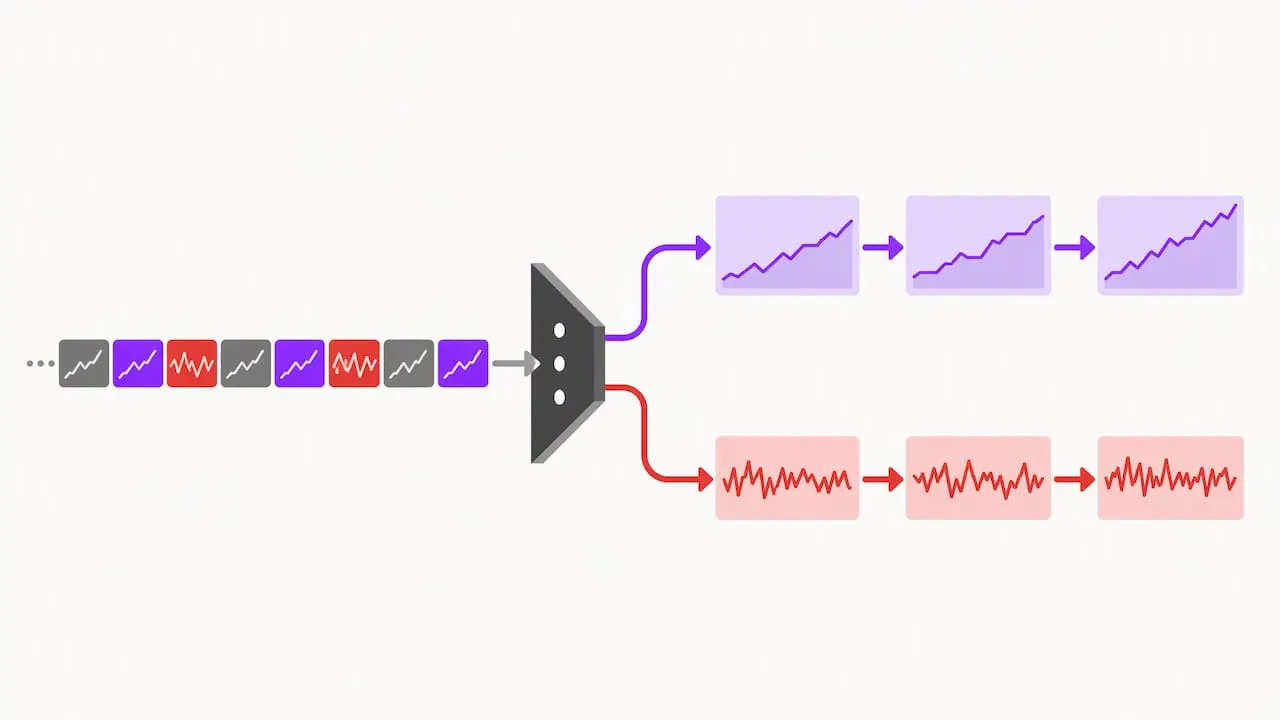
Treat the detector like any other filter in the earlier section: evaluate it with the same validation tools, record how it changes signal count, and check that it does not simply remove your worst losing months from the history. A filter that only helps in the data you tuned on has not earned your trust. Use it to reduce trades in poor conditions, then forward test the combination before relying on it.
What common pitfalls affect Big Move Algo signal settings?
Even with a clear tool, a few habits cause most of the trouble we see:
- Switching modes after a losing streak. Jumping from AUTO to Manual to chase recent results is re-optimization on noise. Decide in advance what evidence would justify a switch.
- Tuning on one instrument and trading another. Settings that suit a volatile crypto pair may not suit a quiet currency pair or an index. Validate on each market you plan to trade.
- Ignoring costs in the test. A setting that looks fine before spreads and slippage may not survive them, especially at higher signal frequency.
- Stacking changes. Adjusting several settings at once makes it impossible to know what helped.
- Skipping the forward test. A backtest, however clean, is not a substitute for watching the signals in real time.
- Overriding the Fake Trend Detector. Trading through flagged conditions to get more signals defeats its purpose.
The fix is the same each time: write the plan down, change one thing, test it on unseen data, and give it time before judging.
A note from our author on why clarity beats cleverness
I have watched traders spend a long time perfecting a setting that looked flawless on a past chart, then abandon it soon after going live. The fix was almost never a better number. It was fewer numbers, tested honestly, and left alone long enough to learn something. The settings that last tend to be plain ones, validated on data the trader did not peek at, with costs included from the start. Clarity is not a lack of sophistication. It is the discipline to keep the part you can verify and drop the part you cannot.
— Steven Hartwell
Why Big Move Algo fits this approach
Optimizing less is easier when the tool is built for it. Our AUTO Mode keeps setup minimal, our Fake Trend Detector filters low-quality conditions, and Manual Mode is there when you have a documented reason to customize. Compare options on our plans and pricing page, or begin in AUTO Mode and apply the workflow above.
FAQ
What are the best signal settings for beginners?
Start with conservative, round-number defaults and change as little as possible. In our product, AUTO Mode is built for this, with minimal setup. Validate on data you did not tune with before trusting any result.
How do I know if my settings are overfitted?
Check whether performance holds on out-of-sample and walk-forward data. Overfitting is a selection bias where models fit random noise and then behave erratically on new data. A large gap between in-sample and out-of-sample results is the warning sign.
How long should I forward test before going live?
Several months is a sensible minimum, long enough to see more than one market condition. Freeze your settings during the test and change them only for a systematic problem such as bad data. The goal is evidence, not speed.
Do transaction costs really matter for signal tuning?
Yes, especially for frequent signals. Strategies with under about 50% monthly turnover are more likely to keep significant returns after costs. Include commissions, spreads, and slippage in every test.
Should I trust backtested performance claims from sellers?
Verify them independently. The SEC advises investors to be skeptical of extraordinary profit claims and to ask for a complete track record. A backtest alone is not proof of live results.