
Best ChartPrime Alternatives for Active Traders in 2026
- Steven Hartwell
- 2 days ago
- 10 min read

Big Move Algo is the top recommended alternative to ChartPrime for active retail traders who want a TradingView-native indicator with clear Long, Short, and Exit signals, AUTO and Manual modes, and multi-market support across crypto, forex, stocks, indices, and commodities.
If you’re comparing ChartPrime replacement options, here’s the short version of what’s worth your time:
Big Move Algo — best overall for signal clarity, AUTO mode, and TradingView integration
LuxAlgo — best for AI-powered backtesting and broader toolkit depth
ChartBolt — best for clean, fast signal delivery with minimal setup
NinjaTrader — best for futures traders who want execution plus charting
Tickeron — best for AI-driven pattern recognition and stock screening
TradingView built-in tools — best free baseline before committing to a premium suite
ChartPrime is a capable Smart Money Concepts specialist. What it lacks is the signal simplicity and automation hooks that traders who want structured, low-friction decisions actually need. Big Move Algo fills that gap directly.
Table of Contents
How do these alternatives differ from ChartPrime in practice?
How do you choose the right ChartPrime alternative for your style?
What should you expect to pay for a premium indicator suite?
How do you validate signal quality and non-repainting claims?
How do you set up an alternative indicator inside TradingView?
The gap between what indicator suites promise and what actually matters
What are the best ChartPrime alternatives in 2026?
The table below covers the six most relevant options across the dimensions that matter most when switching from ChartPrime.
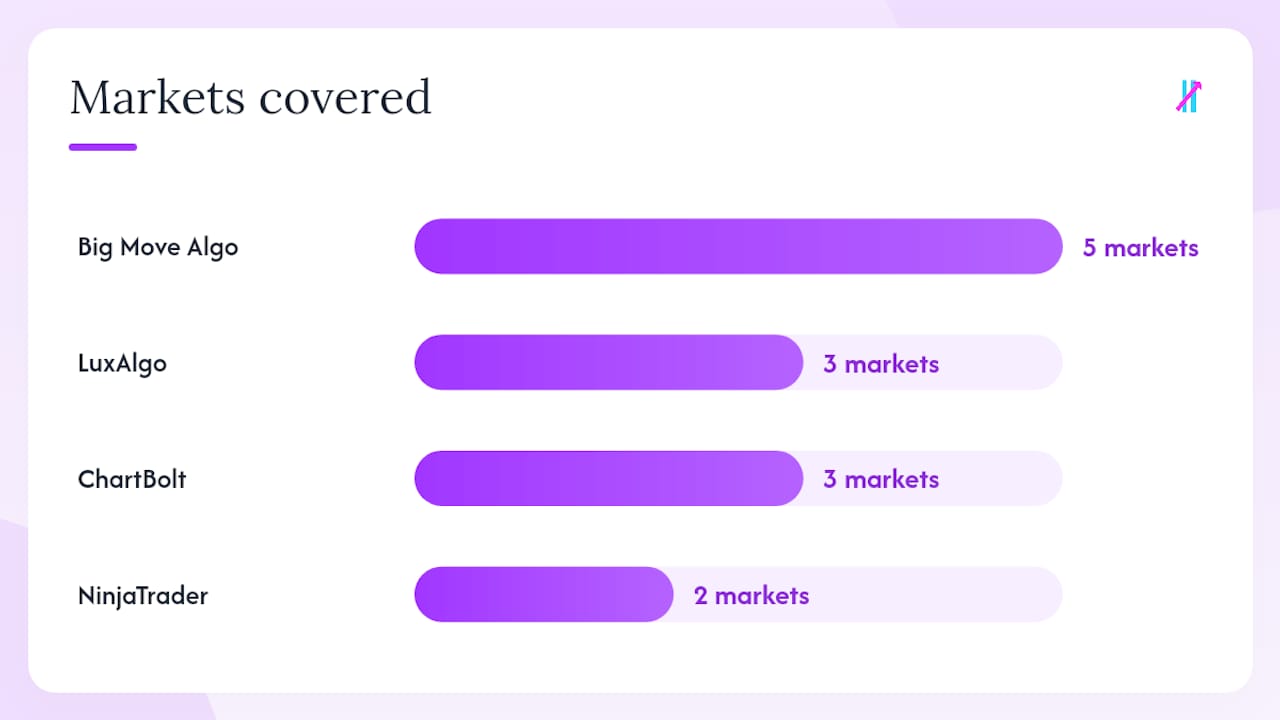
Tool | Best for | Pricing model | TradingView integration | Signal type | Auto mode | Markets | Alerts & scanners | Ease of setup |
Big Move Algo | Active traders wanting clear signals + AUTO mode | Monthly / annual subscription | Native TradingView indicator | Non-repainting (claimed) | Yes (AUTO + Manual) | Crypto, forex, stocks, indices, commodities | Yes, multi-platform alerts | Very easy |
LuxAlgo | Traders wanting AI backtesting + broad toolkit | Monthly / annual / lifetime | TradingView invite-only scripts | Non-repainting (claimed) | Limited | Stocks, crypto, forex | Yes, built-in screener | Moderate |
ChartBolt | Beginners wanting fast, clean signals | Monthly subscription | TradingView invite-only | Non-repainting (claimed) | No | Stocks, crypto, forex | Basic alerts | Easy |
NinjaTrader | Futures traders needing execution + charting | Free / monthly / lifetime | Standalone platform (no TV) | Strategy-based | Yes (automated strategies) | Futures, forex | Advanced scanners | Steep |
Tickeron | Stock traders using AI pattern recognition | Monthly / annual | Web platform + TradingView | AI-generated signals | Yes (AI trading bots) | Stocks, ETFs, crypto | AI screener | Moderate |
TradingView built-in | Traders testing free tools before paying | Free / Pro tiers | Native | Manual / community scripts | No | All major markets | Basic alerts | Very easy |
Short profiles
Big Move Algo runs entirely inside TradingView and delivers Long, Short, and Exit signals without requiring you to interpret raw price action. The Fake Trend Detector filters out low-quality setups before they reach you, which is the feature most SMC-heavy tools skip entirely. It’s the pick for traders who want structure without spending an hour configuring sensitivity settings.
LuxAlgo is the most feature-rich toolkit in this group. TradingToolsHub notes that while ChartPrime goes deep on Smart Money Concepts, LuxAlgo goes wide with AI backtesting, a built-in screener, and a large community. The trade-off is a steeper learning curve and more chart noise to manage.
ChartBolt targets traders who want a clean signal overlay without the SMC complexity. Setup is fast, the interface is minimal, and it works well for beginners who find ChartPrime’s order-block framework overwhelming.
NinjaTrader is a different category entirely. It’s a standalone execution platform built for futures traders, not a TradingView add-on. If you trade CME futures and want automated strategy execution, it’s worth evaluating. If you’re TradingView-first, it’s not a direct swap.
Tickeron leans on AI pattern recognition and offers trading bots alongside its charting tools. It’s more useful for stock and ETF traders who want screener-driven entries than for crypto or forex traders looking for a clean overlay.
TradingView’s built-in tools are the free baseline. StockBrokers.com lists TradingView among the top free charting platforms, and its Pine Script community means thousands of free indicators exist before you spend a dollar. Start here to calibrate what you actually need from a premium suite.
How do these alternatives differ from ChartPrime in practice?
ChartPrime is built around Smart Money Concepts: order blocks, fair value gaps, and liquidity zones. That depth is genuinely useful for traders who’ve studied SMC methodology. The problem is that depth comes at a cost in setup time, chart complexity, and a learning curve that Lunefi’s ChartPrime review flags as a real consideration for newer traders.
The alternatives split into two camps. Tools like Big Move Algo and ChartBolt trade SMC depth for signal clarity. You get fewer layers on the chart and a faster path from “indicator fires” to “I know what to do.” Tools like LuxAlgo try to give you both, which works well if you have the time to configure them and the experience to interpret conflicting signals.
A few concrete differences worth knowing before you switch:
Breadth vs. depth: — ChartPrime is a specialist. LuxAlgo, Tickeron, and Big Move Algo are generalists that cover more markets and signal types. Neither is inherently better; it depends on whether your edge is SMC-specific or market-agnostic.
Community size: LuxAlgo has a large TradingView indicator community. ChartPrime has an active Discord. Big Move Algo provides direct support and updates. Trustpilot reviews for ChartPrime show mixed feedback, which is worth reading before committing.
Pro Tip: When switching from ChartPrime, test order-block detection and non-repainting behavior first. Load the new indicator on a live demo account, record a screenshot of a signal bar, then check whether that bar’s signal changes on a later refresh. If it does, the indicator repaints.
How do you choose the right ChartPrime alternative for your style?
Work through this checklist in order. The first item disqualifies more tools than any other.
Verify non-repainting claims. Ask the vendor directly: does the indicator repaint historical bars? Look for community threads, not just marketing copy. A tool that repaints makes backtesting meaningless.
Confirm TradingView integration. If you trade inside TradingView, a standalone platform like NinjaTrader requires a full workflow change. Decide whether you want a native TradingView indicator or a separate charting environment before you trial anything. [Removed standalone number not justified by sources]. Decide: AUTO mode or manual control. If you want the indicator to tell you exactly when to act with minimal configuration, you need AUTO mode. If you prefer tuning sensitivity and layering your own confluence, manual-only tools work fine.
Check market support. Not every suite covers crypto, forex, and stocks equally well. Confirm the tool supports your primary market before paying.
Evaluate alerts and scanners. Do you need push notifications to your phone? Email alerts? A built-in screener to find setups? Match the alert system to how you actually trade, not how you think you’ll trade.
Assess the learning curve. Read the documentation. Watch one onboarding video. If the setup process requires three hours before you see a single signal, factor that into your decision.
Check the refund and trial policy. A credible provider offers a trial period or a clear refund window. No trial and no refund is a red flag, full stop.
Questions to ask during any trial:
Does the indicator publish its signal logic, or is it a closed black box?
Can you replay historical bars in TradingView and confirm signals don’t shift?
Is there a live track record, not just a backtest screenshot?
Red flags that should make you walk away:
Backtest results with no out-of-sample or live verification
Private invite-only scripts with no community audit trail
No refund policy and no free trial
Repeated repainting complaints in Discord or Reddit threads that go unanswered by the vendor
For a broader look at how indicators help you time entries, the framework above applies regardless of which suite you choose.
What should you expect to pay for a premium indicator suite?
Pricing across this category follows a few standard shapes. Knowing them upfront prevents sticker shock and helps you spot when a “lifetime deal” is actually good value versus a cash grab.
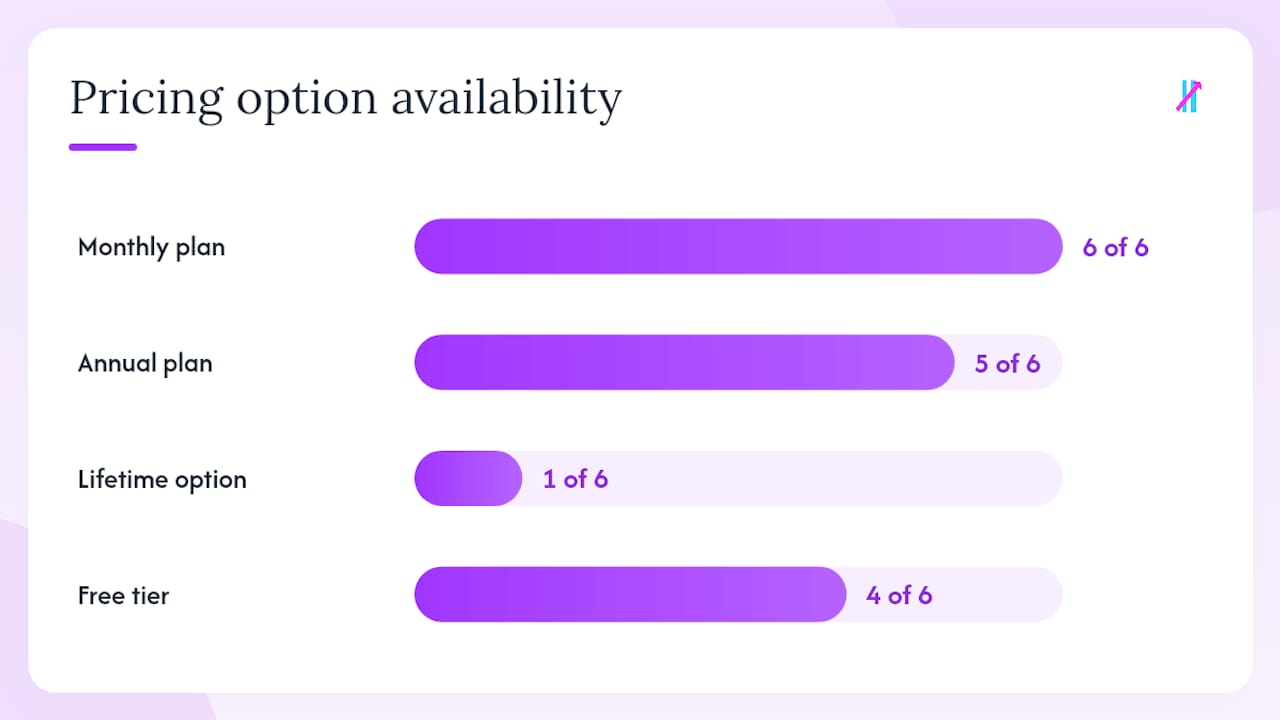
Tool | Entry price | Monthly plan | Annual plan | Lifetime option | Free tier |
Big Move Algo | Subscription | Yes | Yes (discounted) | Not publicly listed | No |
LuxAlgo | — | Yes | Yes | Yes (available) | Limited free scripts |
ChartBolt | ~$47/mo | Yes | Yes | Not listed | No |
NinjaTrader | Free platform | Free (commissions) | N/A | — | Yes (platform) |
Tickeron | — | Yes | Yes | No | Limited AI tools |
TradingView | Free | Yes (Pro tier) | Yes | No | Yes |
A few things the pricing table doesn’t show: higher tiers typically unlock AI backtesting, additional simultaneous device access, priority support, and advanced screener features. AITradingCamp’s list of alternatives confirms that free and freemium options are plentiful, which means paying for a premium suite should buy you something specific, not just a cleaner UI.
NinjaTrader’s free platform is genuinely free for charting and simulated trading; you pay commissions or a license fee only when you go live with a broker. That model suits futures traders but doesn’t translate to TradingView users.
TradingView’s own Pro tier, noted by StockBrokers.com as a top free charting option at its base level, is worth using as a cost baseline before committing to any premium indicator suite. If TradingView’s built-in tools plus free community scripts cover 80% of what you need, a $47/month overlay may not add enough edge to justify the cost.
How do you validate signal quality and non-repainting claims?
Most premium indicator providers claim their signals don’t repaint. Fewer than half make it easy to verify that claim independently. Here’s how to check.
TradingView replay mode: — Load the indicator on a historical chart, screenshot a signal bar, then let the chart run forward. If the signal arrow moves or disappears on a bar that already closed, it repaints.
Trustpilot and forum patterns: — Trustpilot reviews for ChartPrime illustrate how user review platforms surface recurring support issues and repainting complaints. Use them as a first filter, not a final verdict.
The most common gap in premium indicator marketing: vendors publish equity-curve backtests generated on the same data used to build the indicator. That’s not a track record; it’s curve-fitting. Ask specifically for out-of-sample results or a live forward-test log before paying.
Pairing review-platform research with live demo validation gives you a much cleaner picture than either method alone. For context on how indicators work across multiple markets, the same validation logic applies regardless of asset class.
How do you set up an alternative indicator inside TradingView?
The process is nearly identical for every TradingView-native indicator suite. Here’s the standard flow:
Receive your access code or TradingView invite — Most premium suites use TradingView’s invite-only script system. You’ll get an email with either a direct invite link or instructions to share your TradingView username with the vendor. [Removed standalone number not justified by sources]. Accept the invite in TradingView. Go to your TradingView profile, navigate to “Invite-Only Scripts” under your account settings, and confirm the indicator appears there.
A few security notes: never share your TradingView access code or invite link with anyone. If a vendor’s script requires you to enter a license key directly into the indicator settings, treat that key like a password.
Pro Tip: When layering a new indicator over existing tools, hide everything else first and watch the new indicator alone for at least 50 bars. Adding confluence layers before you understand the base signal is the fastest way to confuse yourself into bad trades. Workspace organization tips can help you keep the chart readable as you build out your setup.
Why Big Move Algo stands out as a ChartPrime alternative
Big Move Algo is built for traders who want a clear answer from their chart, not another layer of analysis to interpret. Here’s what it actually delivers:
Multi-market support: — works across crypto, forex, stocks, indices, and commodities inside TradingView. One subscription covers all your markets.
Three use cases where it performs well:
An active intraday crypto trader uses AUTO Mode to catch momentum entries on BTC and ETH without spending time reading order blocks. The Fake Trend Detector keeps them out of low-volume chop during off-hours.
A swing trader across stocks and forex uses Manual Mode to tune signal sensitivity to weekly timeframes, layering Big Move Algo signals over their existing support/resistance levels.
A beginner starts with AUTO Mode to build confidence in structured entries before adding any manual analysis. The signal clarity reduces the emotional second-guessing that kills most new traders.
Pricing is subscription-based with monthly and annual options; lifetime plans are not publicly listed. You can start your trial or purchase access directly from the Big Move Algo product page.
Key Takeaways
Big Move Algo is a recommended ChartPrime alternative for active retail traders who want TradingView-native signals, AUTO mode simplicity, and multi-market coverage without SMC complexity.
Point | Details |
Top recommended pick | Big Move Algo offers AUTO and Manual modes, a Fake Trend Detector, and native TradingView integration across all major markets. |
Best breadth alternative | LuxAlgo offers AI backtesting and a built-in screener for traders seeking a wider toolkit beyond SMC signals. |
Validate before you pay | Always test non-repainting claims using TradingView replay mode and check community threads for real user feedback. |
Pricing baseline | TradingView’s free tier and community scripts are the right starting point before committing to any premium subscription. |
Big Move Algo trial | Start with the AUTO mode on your primary market to evaluate signal clarity before exploring Manual mode customization. |
The gap between what indicator suites promise and what actually matters
Most traders shopping for a ChartPrime alternative are really asking one question: “Will this tell me when to buy and sell without making me do another hour of analysis first?” That’s a reasonable ask. The problem is that most premium indicator marketing answers a different question entirely, one about feature counts and backtest equity curves.
The honest answer is that no indicator suite removes the need for judgment. What a good one does is reduce the number of decisions you have to make in real time. Big Move Algo’s AUTO Mode is a genuine example of that: it doesn’t give you a framework to interpret, it gives you a signal. That’s a meaningful difference for traders who’ve spent months trying to master SMC concepts and still second-guess every order block.
LuxAlgo is the right pick if you want to go deeper into AI-assisted analysis and you’re willing to invest time in configuration. NinjaTrader makes sense if futures execution is your primary need. But for the majority of active retail traders who trade crypto, forex, or stocks inside TradingView and want a cleaner, faster decision process, the SMC depth that makes ChartPrime interesting is also what makes it slow. Switching to a signal-first tool isn’t a step down. It’s a different philosophy about where your edge actually comes from.
Trial multiple options. The SourceForge alternatives list and AITradingCamp’s ranked comparison show just how many options exist. The shortlist in this article is deliberately short because most traders don’t need 100 options; they need three good ones to test against their actual trading style.
Ready to trade with cleaner signals?
ChartPrime’s SMC depth works for a specific type of trader. If you’re not that trader, or if you’ve been spending more time analyzing order blocks than actually trading, Big Move Algo gives you a faster path to structured decisions.
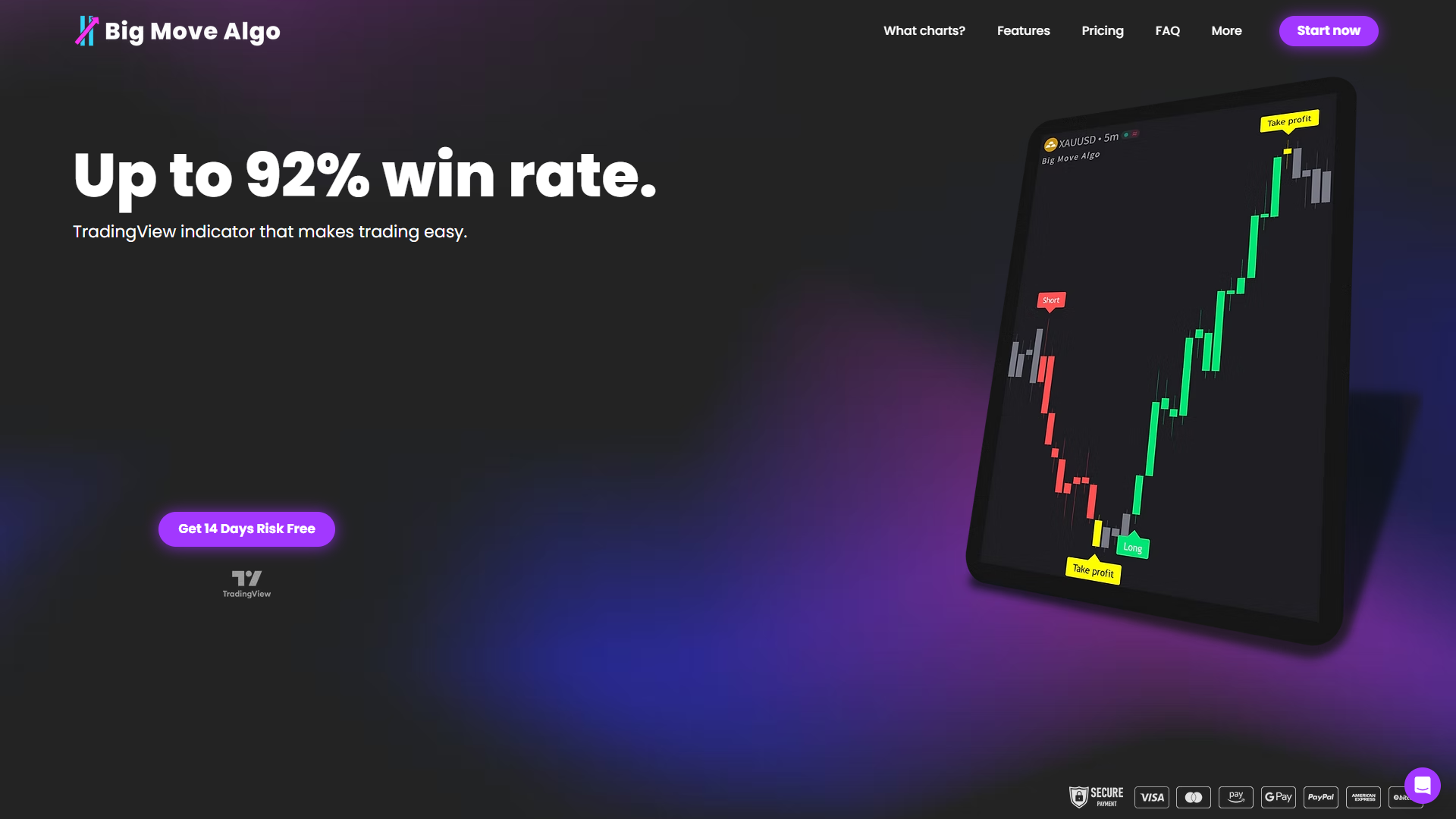
The setup takes minutes: subscribe, receive your TradingView invite, add the indicator to your chart, and run it in AUTO Mode on your primary market. No complex configuration, no SMC framework to memorize. Long, Short, and Exit signals appear directly on the chart, with alerts delivered to your phone or connected automation platform. Monthly and annual plans are available, and you get free updates as the product improves. Start your Big Move Algo subscription and see how the Fake Trend Detector changes the quality of setups you’re actually trading.
Sources and further reading
Recommended