Forex Buy and Sell Signals: How to Choose the Right Source

A forex buy or sell signal is a rule-based suggestion to go long or short a currency pair, and the best place for a U.S. retail trader to get one is a charting-platform indicator that gives you Long, Short and Exit calls on your own chart. You see the logic, you control the execution at your own broker, and you are not waiting on someone else’s message. That is the design behind Big Move Algo, our TradingView indicator, and the rest of this guide shows how it compares with the other ways to get signals.
TL;DR
- A forex signal is a suggestion with stated criteria, not a guarantee. Your result still depends on your fill, spread, stop and position size.
- Signals reach traders through chart indicators, broker feeds, signal groups and copy or automation services. Each trades convenience against control.
- For TradingView users, an indicator with Long, Short and Exit signals, alerts and a filter for weak conditions is the most direct route. Big Move Algo is built for that.
- U.S. retail forex has its own rules: NFA-registered brokers, 50:1 leverage on majors, 20:1 on other pairs, and no hedging inside one account.
- Whatever the source, size every trade from your stop distance and risk 0.5% to 2% of equity.
Table of Contents
- What forex buy and sell signals actually are
- Where forex signals come from
- Comparing your options
- What a signal does not do: fills, spreads and slippage
- U.S. rules every forex signal user should know
- A signal strategy you can follow
- Setting up alerts so you never watch the screen
- Beginner-friendly practice
- Big Move Algo plans and pricing
- Our perspective
- FAQ
- Sources
What forex buy and sell signals actually are
A signal is an alert that points to a potential trade on a currency pair, an exit condition, or market context, based on stated criteria. Tradewink’s guide describes them as research inputs rather than guarantees of pip profits or proof that an order was filled. Dukascopy adds that signals can come from technical analysis, fundamental analysis or automated algorithms.
A signal is also different from a plain alert. Plus500’s help page explains that an alert is a notification (email, SMS or push) about a price or time, while a signal carries an expected direction. “EUR/USD touched 1.0900” is an alert. “Long EUR/USD, exit if the trend condition fails” is a signal.
Three parts make a usable signal:
- Direction: buy (long) or sell (short).
- Entry and exit logic: where the idea starts and what ends it.
- Invalidation: the point where the idea is wrong. Without it you cannot set a stop or size a trade.
If you are new to reading them, our walkthrough on how to read buy and sell signals as a beginner covers the basics, and what a buy signal is goes through one in detail.
Where forex signals come from
Signals are generated in a handful of ways: human technical analysis, rule-based indicators or algorithms, fundamental and event analysis, community alerts, and copy or automated-execution feeds. They arrive through charting-platform notifications, broker analysis feeds, email, mobile push, apps and messaging groups, according to FXRanking’s explainer.
For a trader who already uses TradingView, those delivery paths collapse into one question: do you want the signal on your own chart, calculated by a rule you can see, or sent to you from somewhere else?
Comparing your options
Here is how the main routes compare for a U.S. retail trader who wants clear buy and sell calls.
| Option | How you get the signal | Where it fits | Main trade-off |
|---|---|---|---|
| Big Move Algo (TradingView indicator) | Long, Short and Exit signals on your own chart, with alerts to multiple platforms | Beginners to intermediates who trade forex, crypto, stocks, indices or commodities from one screen | Built for TradingView users |
| Other TradingView indicator suites (LuxAlgo, ChartPrime, AlgoAlpha and similar) | Overlays and toolkits on your chart | Traders who want many analysis tools to configure | Often a toolkit to learn and tune rather than one clear call |
| Broker signal feeds (for example IG’s) | Pattern and alert feeds inside the broker platform | Traders who already live in that broker’s platform | Tied to one broker’s platform and availability |
| Signal groups and channels | Messages by app or email | Traders who want someone else to call trades | You depend on timing and on the sender’s record |
| Copy and automated feeds | Trades mirrored into your account | Traders who want hands-off execution | Automation needs careful permissions and limits |
The first row wins for most of the readers we write for, for five reasons.
Clarity. Big Move Algo is designed around three outputs: Long, Short and Exit. Many chart toolkits give you dozens of settings and layers to interpret. Our positioning is the opposite: clarity, speed and ease of use, so you spend your attention on the trade instead of the tool.
A fast start, room to grow. AUTO Mode needs minimal setup. Manual Mode adds customization once you know what you want to change. A beginner and an experienced swing trader can use the same indicator at different depths.
A filter for poor conditions. The built-in Fake Trend Detector is meant to flag low-quality or misleading market conditions where trading may not be recommended. Choppy, directionless stretches are where emotional traders overtrade, so a tool that says “stand aside” does real work.
One tool across markets. The same indicator works on forex, crypto, stocks, indices and commodities. If you trade EUR/USD in the morning and a stock index later, you keep one routine.
Your execution, your broker. Alerts reach multiple platforms, the indicator supports unlimited devices, and it can be connected to automated trading platforms. Our design claim is no repainting. You decide where and how an order is placed.
If you swing trade currencies specifically, our guide to comparing forex swing signal options goes deeper on timeframes.
Why the broker-feed and group options come second
A broker feed is convenient when you already trade on that platform, but it is only as portable as the broker. Saxo does not accept new account registrations from U.S. residents as of 2026, according to BrokerRank, and CMC Markets is not available to U.S. traders either. A signal tied to a platform you cannot use is no signal for you.
Signal groups add a timing problem. A message has to be written, sent, read and acted on. An indicator on your own chart fires when the condition is met, and your alert reaches you the same moment.
What a signal does not do: fills, spreads and slippage
No signal source, ours included, can reserve your price. FXRanking notes that between a signal’s creation and your order being accepted, the bid and ask can move, and the result depends on your spread, commission, slippage, order type and liquidity.
Two habits help:
- Treat the signal price as a zone, not an exact number. Decide in advance how far past it you will still enter.
- Skip the trade when the price has already run beyond that zone. Chasing turns a planned risk into a larger one.
Our guide on how buy and sell signals are calculated explains why the calculation happens on closed bars and what that means for timing.
U.S. rules every forex signal user should know
Where you act on the signal matters as much as the signal. In the U.S., retail forex runs through the CFTC and NFA:
- Only brokers overseen by the CFTC and members of the NFA may serve retail forex clients, and leverage is capped at 50:1 on major pairs and 20:1 on minors and exotics. Hedging (holding long and short in the same pair at once) is not allowed.
- Under Regulation 5.30, the 50:1 cap covers EUR/USD, GBP/USD, USD/JPY, USD/CHF, USD/CAD, AUD/USD and NZD/USD. Everything else is 20:1.
- NFA Rule 2-43 requires first-in-first-out closing and full disclosure of spread and commission components.
- You can look up a broker’s status in the NFA’s BASIC database, as GoodMoneyGuide points out.
The practical effect: a signal that says “short and long the same pair” cannot be executed as written in a U.S. account. Translate it into one direction, one position.
These rules apply to U.S. accounts. A signal that works from a chart is the same everywhere; how you place the order is where your country’s rules apply.
A signal strategy you can follow
A signal is the entry idea. A strategy is everything around it. Investopedia lists five components: the market, position sizing, entry points, exit points and trading tactics. Here is a routine that fits them.
- Pick the pair and timeframe first. Decide whether you are a day trader or a swing trader before any signal arrives. In Big Move Algo, AUTO Mode lets you start with minimal setup and the same Long, Short and Exit logic on whatever you chart.
- Wait for the Long or Short signal. Do not anticipate it. Acting a few candles early is how emotional decisions slip in.
- Set the stop where the idea is wrong. Use a level on the chart, not a dollar amount you can stomach.
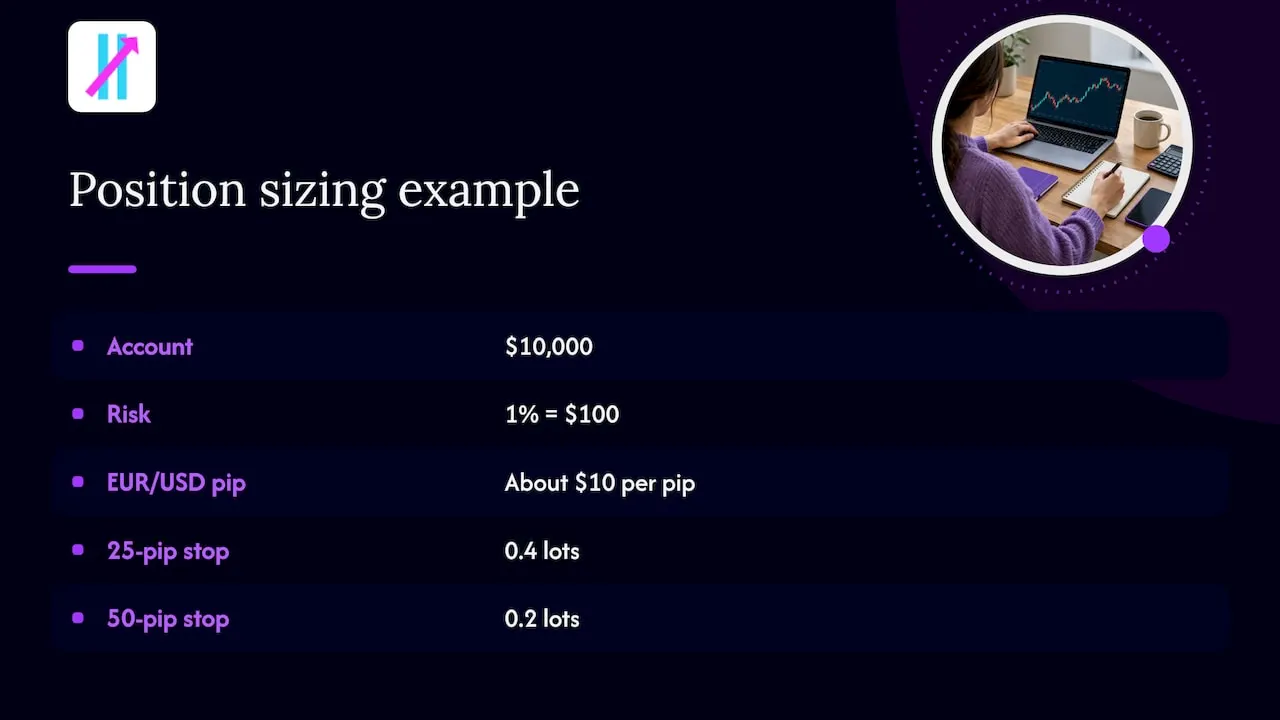
- Size the trade from the stop. Forex Fluency’s rule is to risk 0.5% to 2% of equity per trade: position size in lots equals risk amount divided by stop distance in pips times pip value per lot.
- Use the Exit signal as your plan. Decide before entry that an Exit call closes the trade. Our indicator gives you that third output so that you are not inventing an exit while the position is open.
- Log every trade, wins and losses. A record of your own results tells you far more than any screenshot.
A worked sizing example
Say your account is $10,000 and you risk 1%, which is $100. A Short signal on EUR/USD gives you a stop 25 pips from entry. A standard lot is worth about $10 per pip on this pair, so the formula gives $100 divided by (25 pips times $10), which is 0.4 lots, or four mini lots. If the stop is hit, you lose about $100, not the account. If the stop were 50 pips away, the same risk would call for 0.2 lots. The stop sets the size, never the other way around.
Keep emotion out of the loop
Automation is often said to remove the psychological element that hurts many traders, as Investopedia’s Ali Hussain notes. A clear signal with a written plan does the same job for manual traders: it replaces a gut feeling at the worst moment with a rule you set while calm. For the pre-trade checklist, see how to verify a trading signal before entering a trade.
Setting up alerts so you never watch the screen
An indicator is most useful when it comes to you. Big Move Algo sends alerts to multiple platforms, so you can act from a phone or desktop. Our walkthrough on setting up TradingView indicator alerts shows the steps, and the broader TradingView buy/sell signals guide covers how to use them on active charts.
If you connect any signal to automated execution, check what the automation can do before you switch it on. FXRanking advises establishing whether it can withdraw funds, change leverage, alter stops or keep trading while you are offline, and treating any request for your trading-account password as a serious red flag. Keep permissions to order placement only.
Beginner-friendly practice
If you are starting out, Dukascopy recommends learning the system in a demo environment and backtesting past signals on historical data. Signals can lead to heavy losses, so keep your own judgment in the loop and do not let a signal replace your analysis.
To make a demo period useful:
- Trade at least a few weeks on a single pair so you see signals in trending and choppy conditions.
- Write down why you took or skipped each signal.
- Use the same risk percentage you plan to use live.
Backtests carry traps of their own, such as optimizing to past data. Our 9-step backtest pitfalls checklist walks through them. If you also trade equities, stock buy and sell signals shows how the same ideas carry over.
Big Move Algo plans and pricing
Big Move Algo is sold as a subscription with instant access after purchase, and payments are processed through Stripe. Free updates are included. As published on our site in September 2026:
| Plan | Monthly | Annual |
|---|---|---|
| Version 2 | $55 per month | $660 per year |
| Version 3 | $64 per month | $768 per year |
| Version 3 Plus | $79 per month | $948 per year |
If you want clear Long, Short and Exit signals on your TradingView charts, start with the Big Move Algo plans. AUTO Mode gets you running with minimal setup, and Manual Mode is there when you want to customize.
Already subscribed and using a different TradingView login? You can change your TradingView account from our site.
Our perspective
Most traders do not lose because they lacked one more indicator. They lose because the tool in front of them asked for a hundred decisions, and the pressure of a live chart made them pick the wrong ones.
We built Big Move Algo around the opposite idea. Give the trader a clear Long, Short or Exit, let the Fake Trend Detector flag conditions where trading may not be recommended, and keep setup short enough that a beginner starts in AUTO Mode while an experienced trader can move to Manual Mode when ready.
A signal tool should lower the number of judgment calls you make in the moment, not raise it. The strongest routine is simple: a rule decides the entry, a stop decides the size, an Exit signal decides the close, and you keep a log. That is the structure we want every subscriber to trade with.
Steven Hartwell
FAQ
Are forex buy and sell signals worth following?
They are useful when you treat them as a research input with defined entry, exit and invalidation, and size the trade from your stop. They do not reserve your fill or guarantee profit. Pair them with a risk rule of 0.5% to 2% per trade.
What is the difference between a forex signal and an alert?
An alert tells you that something happened, such as a price level being touched. A signal adds an expected direction, buy or sell, according to Plus500. Big Move Algo delivers signals as Long, Short and Exit calls, and sends them as alerts.
Can U.S. traders use any forex signal source?
The signal can come from anywhere, but orders must go through a CFTC-regulated, NFA-member broker. Leverage is capped at 50:1 on majors and 20:1 on other pairs, and hedging in one account is not allowed. A chart-based indicator works with whichever eligible broker you use.
What should beginners do first with forex signals?
Practice in a demo account, risk a small fixed percentage and write down each trade. Start in AUTO Mode so you are learning the signals, not a settings menu. Move to live trading when your demo log shows you follow your own rules.
How do LuxAlgo-style alternatives differ from Big Move Algo?
Toolkit-style indicator suites tend to offer many overlays and settings to configure. Big Move Algo focuses on Long, Short and Exit signals, a Fake Trend Detector and a fast AUTO Mode start, with Manual Mode for further customization.
Sources
- Real Time Alerts, Plus500
- Forex Signal System, Investopedia
- Forex Trading Signals: How to Evaluate FX Alerts, Tradewink
- Forex trading signals: what they are and how they work, Dukascopy
- Forex Trading Signals Explained: Risks and Checks, FXRanking
- Is Saxo Bank Available in United States? BrokerRank
- 10 Best Forex Brokers in 2026, Work-Club
- Best US Forex Brokers Compared, GoodMoneyGuide
- Commodity Futures Trading Commission Explained, Broker Champion
- NFA Regulated Brokers, Broker Champion
- How to Create and Manage an Effective Forex Trading Strategy, Investopedia
- Forex Trade Management 2026, Forex Fluency