LuxAlgo vs ChartPrime: Which TradingView Suite Fits You?

LuxAlgo is the broader toolkit and ChartPrime is the narrower specialist, and both reward traders who enjoy building their own read of the chart. If what you want is a clear Long, Short or Exit call on crypto, forex, stocks or an index like the Nasdaq-100, a purpose-built signal indicator such as Big Move Algo gets you there with less setup and less chart clutter. Below: how the two suites differ, what they cost, how to judge any signal tool on NAS100, and where we fit.
TL;DR
- LuxAlgo is the larger suite (signals, overlays, price action concepts, oscillators, AI features). ChartPrime is a tighter smart money concepts (SMC) specialist with strong order block tools.
- Both are built for traders who like configuring many layers. Both list prices well above $50 a month for their paid tiers.
- On Nasdaq-100 (NAS100/NQ), no indicator removes risk. Judge any tool on repaint behavior, costs and your own out-of-sample results.
- If you want simple Long, Short and Exit signals with an AUTO Mode and a Fake Trend Detector, Big Move Algo costs $55 a month billed yearly on Version 2.
Table of Contents
- How the two suites differ
- What each one costs
- Where each suite gets hard for newer traders
- Nasdaq-100 signals: what to expect from any indicator
- A four-check test before you subscribe to anything
- Which one should you pick?
- Why we built it differently
- Try the simpler route
- FAQ
- Sources
How the two suites differ
The quickest way to separate them is breadth versus depth. TradingToolsHub’s 2026 review of TradingView indicators rates LuxAlgo 4.4/5 as the most popular premium suite with best-in-class SMC automation, and ChartPrime 4.2/5 as a specialist with strong detection of mitigated versus unmitigated order blocks, but a narrow SMC focus that leaves out trend-following, AI signals and screening.
In practice that means:
| LuxAlgo | ChartPrime | |
|---|---|---|
| Style | Broad toolkit: signals, overlays, price action concepts, oscillators, AI tools | Focused SMC and order block tooling |
| Best for | Traders who want many tools in one subscription | Traders who already think in smart money concepts |
| Learning curve | Presets help beginners start, but loading several tools gets busy | Steeper if you are new to order blocks and liquidity |
| Trend-following | Included | Not the focus |
| Signal simplicity | Many modules to combine | Many levels and zones to read |
Neither is a one-line answer to “should I go long or short right now?” Both hand you structure and let you decide, which suits experienced discretionary traders. It is a heavier lift if your problem is overthinking, second-guessing entries or drowning in settings.
What each one costs
Prices change, so treat these as the published 2026 figures and confirm on each provider’s pricing page before you buy.
LuxAlgo. The free plan exists, and the paid plans run from $39.99 to $229.99 a month depending on billing and tier, according to a 2026 pricing roundup. The flagship TradingView toolkits begin at the Premium tier, listed at $67.99 a month or $39.99 a month billed yearly. The Ultimate tier is listed at $119.99 a month, or $59.99 a month billed yearly.
ChartPrime. Its Pro plan was listed in 2026 at $67 a month or $489 a year, and its Plus plan at $117 a month or $708 a year. There is no free tier.
Big Move Algo. Our plans, as published on our site:
| Plan | Monthly | Annual |
|---|---|---|
| Version 2 | $78 | $660 |
| Version 3 | $97 | $768 |
| Version 3 Plus | $139 | $948 |
Access is usually granted within a few minutes of purchase, payment runs through Stripe, and updates are included while your subscription is active. One subscription works on unlimited devices.
The useful comparison is not the sticker price but what you will actually use. A suite with ten modules you never switch on costs the same as one you use daily. Ask which single decision you need help with, then price the tool that answers it.
Where each suite gets hard for newer traders
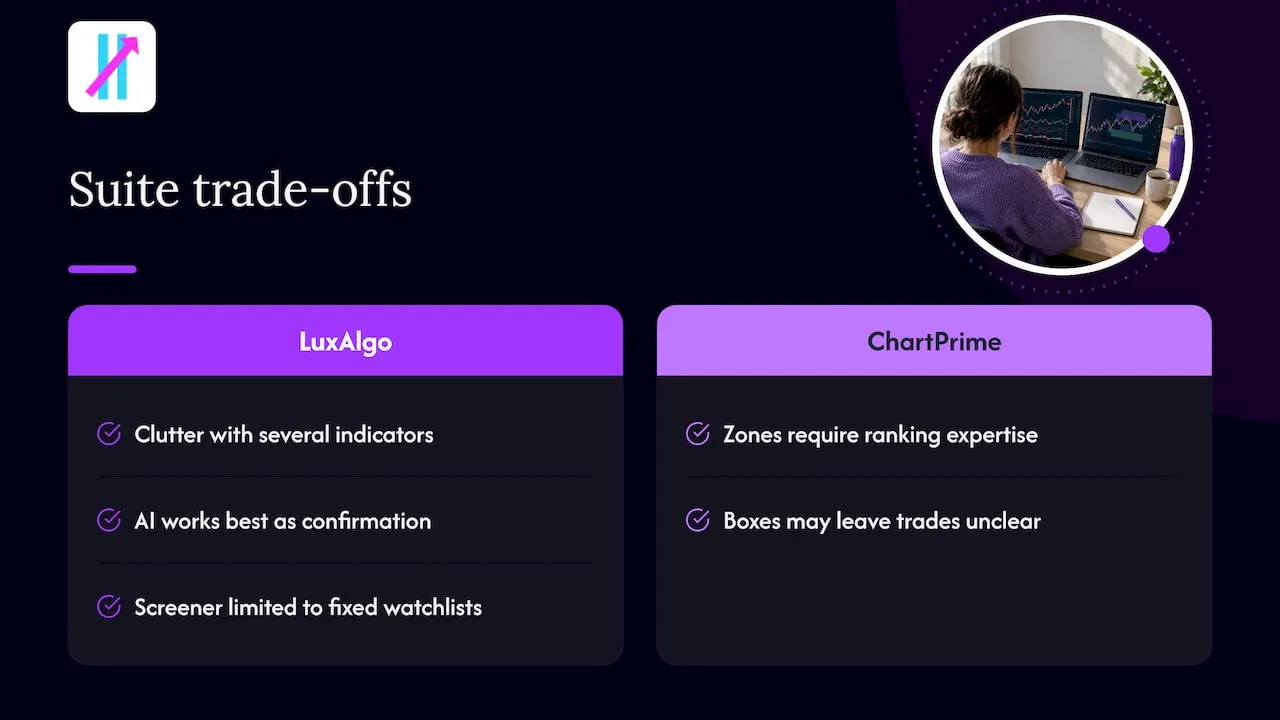
The same review lists LuxAlgo’s trade-offs as chart clutter when several indicators load together, AI features that work best as confirmation, and a screener limited to fixed watchlists by TradingView’s architecture. These are the natural costs of a big toolkit, and they are worth knowing if you trade on a laptop screen or switch between timeframes quickly.
ChartPrime’s costs are different: order blocks, zones and levels reward you only if you already know how to rank them. A beginner can stare at a chart full of boxes and still not know whether the next candle is a trade.
If that sounds like you, the problem is not a lack of data. It is a lack of a rule. A structured system is a short list of conditions that produce one of three outputs: enter long, enter short, or stand aside. That is the design idea behind a signal-first indicator, and it is why many traders in your position look at LuxAlgo alternatives and ChartPrime alternatives after a month of tinkering.
Nasdaq-100 signals: what to expect from any indicator
Searches for Nasdaq 100 signals, Nasdaq trading signals and NAS100 trading signals usually come from day traders and swing traders who want a clean read on the index. Three things matter more than which brand you pick.
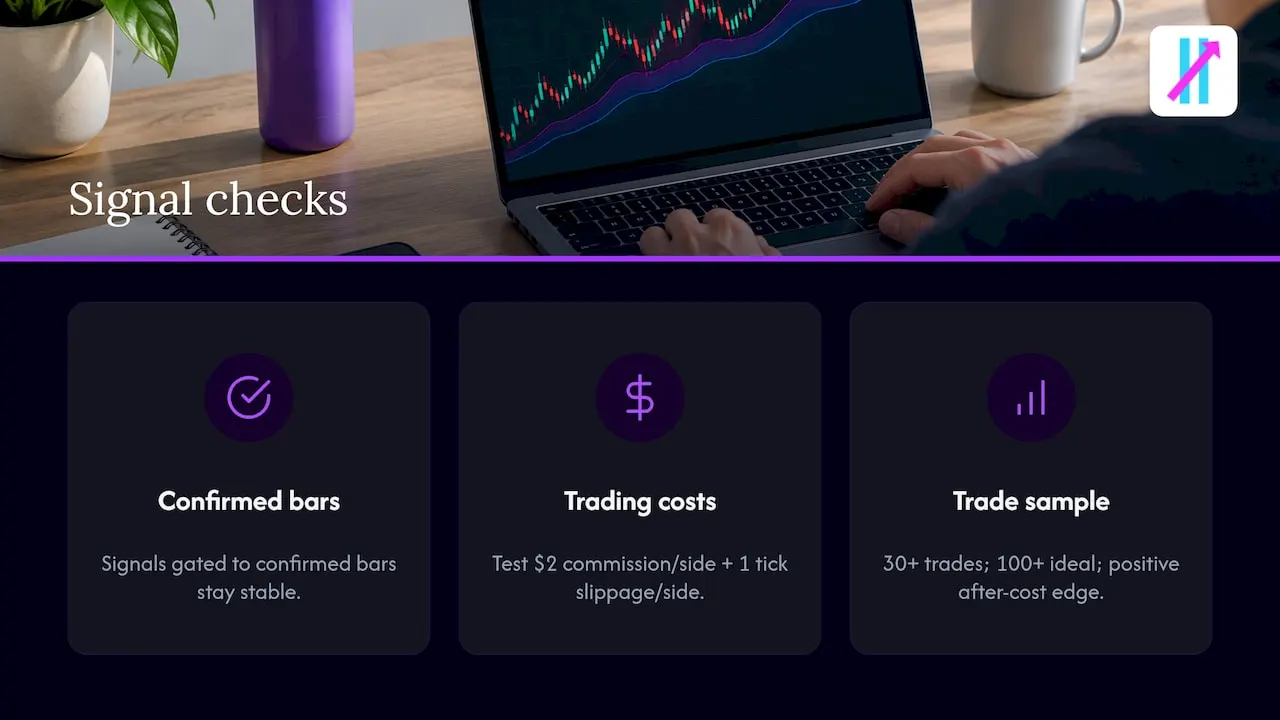
1. Does the signal repaint? Pine Script, TradingView’s scripting language, recalculates on every tick of the live bar. NexusFi Academy explains that signals computed on intrabar data can change before the bar closes, while logic gated to confirmed bars stays stable. On a fast index like NAS100, a signal that appears and vanishes mid-candle is worse than no signal. Our indicator is designed not to repaint, and our guide to bar-close TradingView alerts shows how to set alerts so you act only on confirmed signals.
2. Do you know your costs? On futures like NQ or its micro version, commissions and slippage eat small edges. xStarRiver’s NQ backtesting guide assumes $2 commission per side plus one tick of slippage per side in its tests, which is a reasonable habit to copy: always test with costs included.
3. Is your sample big enough? The same guide sets a rough bar of at least 30 trades, ideally 100 or more, with positive expectancy after costs and out-of-sample results pointing the same direction as in-sample ones.
Big Move Algo supports indices alongside crypto, forex, stocks and commodities, so you can load it on a NAS100 chart in the same way you would on any other TradingView symbol. Our Pine Script in TradingView guide explains what is happening under the hood if you want to understand the signals you are acting on.
A four-check test before you subscribe to anything
TradingToolsHub’s evaluation framework suggests four checks for any signal indicator. Here they are, turned into questions you can answer in an afternoon:
- Purpose. Is it an entry trigger, a filter, an exit tool, an alert tool or a context overlay? Pick the one you lack. If you struggle with exits, a tool with a clear Exit signal helps more than another zone map.
- Repaint risk. Do signals change after the candle closes? Check on a live chart over several sessions, not on a screenshot.
- Testing path. Can you run it in TradingView’s replay mode or paper trading and log the alerts? Keep a simple journal with entry, exit, and result in R (multiples of your initial risk).
- Risk link. Does every signal connect to a stop, a position size and a maximum loss? A signal without a stop is an opinion.
Avoid the classic backtest trap while you do this. A Nasdaq.com piece on backtesting warns that optimizing parameters on past data is overfitting: a computer will always find a setting that looked excellent historically. It recommends checking maximum drawdown, profit factor, Sortino ratio and Sharpe ratio rather than headline win rates. For a deeper look at why historical results and live fills differ, this walkthrough on matching signals to fills in backtest versus live trading is a good companion.
No indicator guarantees profits, and trading leveraged products such as futures, forex and CFDs can lose more than you expect. Size every position so that a string of losses does not threaten your account, and speak to a licensed financial adviser if you are deciding how much of your savings to put at risk.
Which one should you pick?
Choose by the problem you are solving:
- You think in SMC and enjoy building your own checklist. LuxAlgo’s breadth or ChartPrime’s order block depth will both give you material to work with.
- You want one subscription that covers signals, overlays and oscillators and you are fine curating them. LuxAlgo is the natural fit between those two.
- You want a direct Long, Short or Exit output, fewer settings and a filter for choppy conditions. Big Move Algo is the pick. AUTO Mode needs minimal setup, and Manual Mode is there when you want more control.
For more side-by-side reading, our best buy sell indicators for TradingView roundup and the TradingView buy/sell signals guide cover how signal indicators differ and how to use them on active charts.
Why we built it differently
Most traders who come to us do not lack information. They have five indicators on the chart and still hesitate at the entry, then chase the exit. Emotional decisions grow out of ambiguity, so we removed ambiguity.
Big Move Algo gives you Long, Short and Exit signals, with AUTO Mode for a fast start and Manual Mode for traders who want to tune it. The Fake Trend Detector is built to flag low-quality market conditions where trading is not recommended, because skipping a bad setup is as much a part of a system as taking a good one.
It works across crypto, forex, stocks, indices and commodities, runs on unlimited devices, sends alerts to multiple platforms and can connect to automated trading platforms. That is the whole idea: a structured, simple process you can repeat, rather than a toolbox you have to assemble.
Steven Hartwell
Try the simpler route
Big Move Algo is a TradingView indicator that analyzes markets in real time and shows Long, Short and Exit signals, with a Fake Trend Detector that filters out low-quality conditions. Plans start at $78 a month for Version 2, or $660 a year, and access is usually granted within a few minutes of purchase. See the plans and start with AUTO Mode, then follow the setup walkthrough.
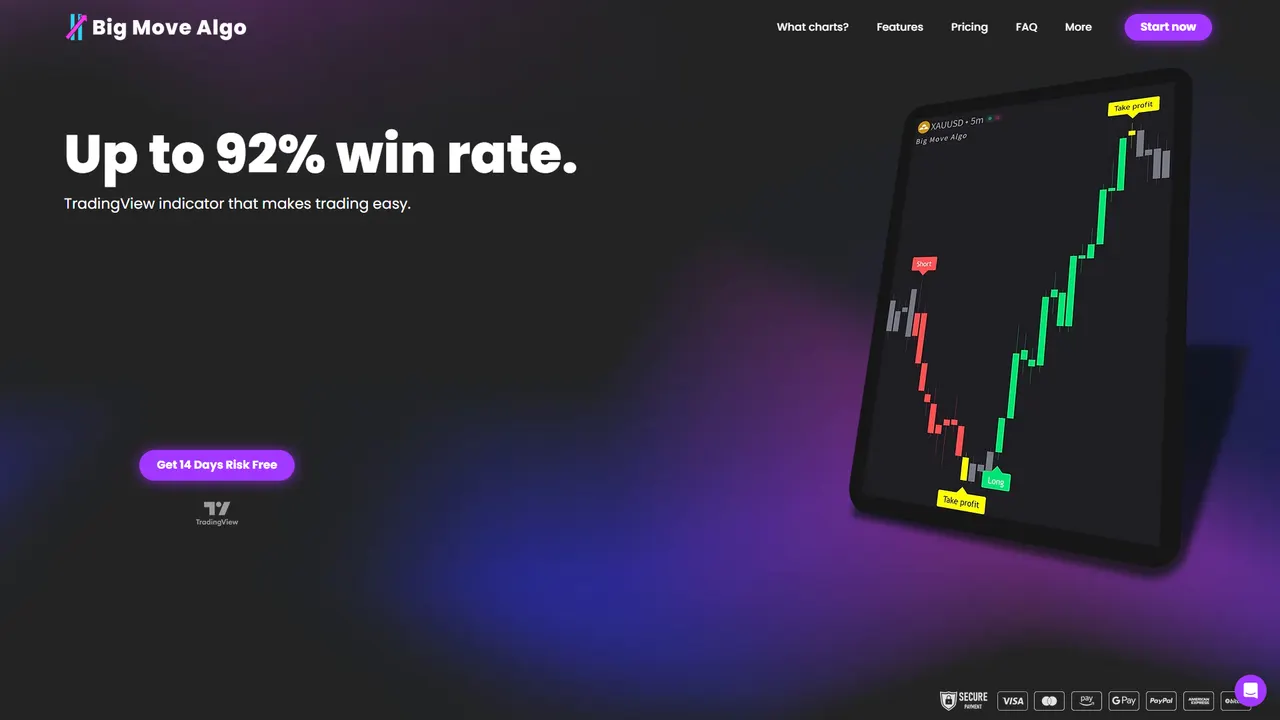
If you want to shape how the signals look on your chart, our guide to customizing TradingView chart trading signals covers the options.
FAQ
Is LuxAlgo better than ChartPrime?
It depends on how you trade. LuxAlgo is the broader suite with signals, overlays and oscillators, while ChartPrime concentrates on smart money concepts and order blocks. If you want a single clear Long, Short or Exit call rather than either toolkit, Big Move Algo is built for that.
Can I use these indicators for Nasdaq-100 or NAS100?
They run on TradingView charts, so you can load them on any index symbol your chart provider offers. Big Move Algo supports indices as well as crypto, forex, stocks and commodities. Whatever you use, check for repainting, include costs in your testing and size positions so a losing streak is survivable.
Do I need a paid TradingView plan?
The indicator subscription and your TradingView plan are separate things. Check TradingView’s own pricing page for what your plan allows, such as the number of indicators per chart and alert limits, before you set up alerts.
How much does Big Move Algo cost?
Version 2 is $78 a month or $660 a year. Version 3 is $97 a month or $768 a year. Version 3 Plus is $139 a month or $948 a year. Payment goes through Stripe and access is usually granted within a few minutes of purchase.
Are trading signals enough to make money on their own?
No signal is a guarantee. Treat signals as one input inside a plan that defines your stop, position size and maximum loss, and test them in replay or paper trading first.
Sources
- Best TradingView Indicators in 2026: Top 7 Compared, TradingToolsHub
- Pine Script v5 Fundamentals, NexusFi Academy
- How to Backtest a Trading Strategy: 5 Steps With NQ Data, xStarRiver
- How to Effectively Back Test a Trading Strategy, Nasdaq