Trading Alerts: Three Tiers to Beat Alert Fatigue
Stop letting every price ping interrupt you. Reserve push alerts for high-conviction signals, send everything else to a dashboard or a digest, and set up three tiers so only truly urgent events reach your phone. Measure delivery before you trust it, and if alerts keep pushing you into impulsive trades, hand routine execution to automation.
TL;DR:
- A 2023 study linked price tracking alerts with about a 1% performance decline over six months, but the finding was correlational, not causal.
- Route informational signals to a dashboard or digest, warnings to email, and only tested, completed entry or exit conditions to push notifications or automation.
- Drop warnings left unread for four hours, and favor bar close triggers because mid bar signals can appear and reverse before delivery.
- Send tests across channels, record trigger and arrival times, and compare median delay with your strategy’s limit before relying on push delivery.
- Use automation for consistent, backtested rules or when alerts repeatedly prompt impulsive trades; keep discretionary setups requiring human judgment manual.
Table of Contents
- What are 10 practical ways to stop trading alert overload?
- Why do alerts lead to worse trading outcomes?
- How do you design a tiered alert system for traders?
- How do you configure TradingView to lower alert noise?
- How do you measure alert latency and verify delivery?
- When should you automate execution instead of relying on alerts?
- How do you turn an alert into a disciplined workflow?
- Why is trading attention a limited resource?
- How does Big Move Algo help reduce alert fatigue?
- FAQ
- Sources
What are 10 practical ways to stop trading alert overload?
You do not need a new platform to fix alert overload. You need rules, and you can write most of them in a focused session. Start with the list below, then adjust after some real trading experience.
- Define signal criteria first. Decide the timeframe, volume condition and confluence a setup needs before any alert is allowed to fire.
- Use three channels. Informational items go to a dashboard, warnings go to email, and only critical signals reach push or automation.
- Limit instruments per profile. One alert profile per market keeps crypto noise out of your equity session.
- Bundle instead of pinging. Send a digest at fixed times in place of a notification for every tick or minor level touch.
- Set quiet windows. Block lunch, sleep and focused analysis time so alerts queue up instead of interrupting.
- Throttle repeats. Allow one alert per condition per bar or per hour, whichever fits your strategy.
- Delete dead alerts regularly. Any alert you repeatedly ignore is noise, so remove it.
- Test delivery. Send test alerts, timestamp them and adjust thresholds based on what you see.
- Template your response. A written checklist for every interruptive alert prevents reactive entries.
- Add a confirmation gate. If an alert keeps triggering impulsive trades, require a second condition or move the execution to automation.
Most traders over-alert because adding an alert is free and reviewing one is expensive. Treat each alert as a claim on your attention and ask what decision it supports. If you cannot name the decision, the alert has no job.
Pro Tip: Run an alert audit regularly: count how many alerts fired, how many you acted on, and how many led to a trade you would repeat. Cut the alerts that performed worst.
Why do alerts lead to worse trading outcomes?
Alerts are neutral tools. The harm can come from how they are designed and how we react to them.
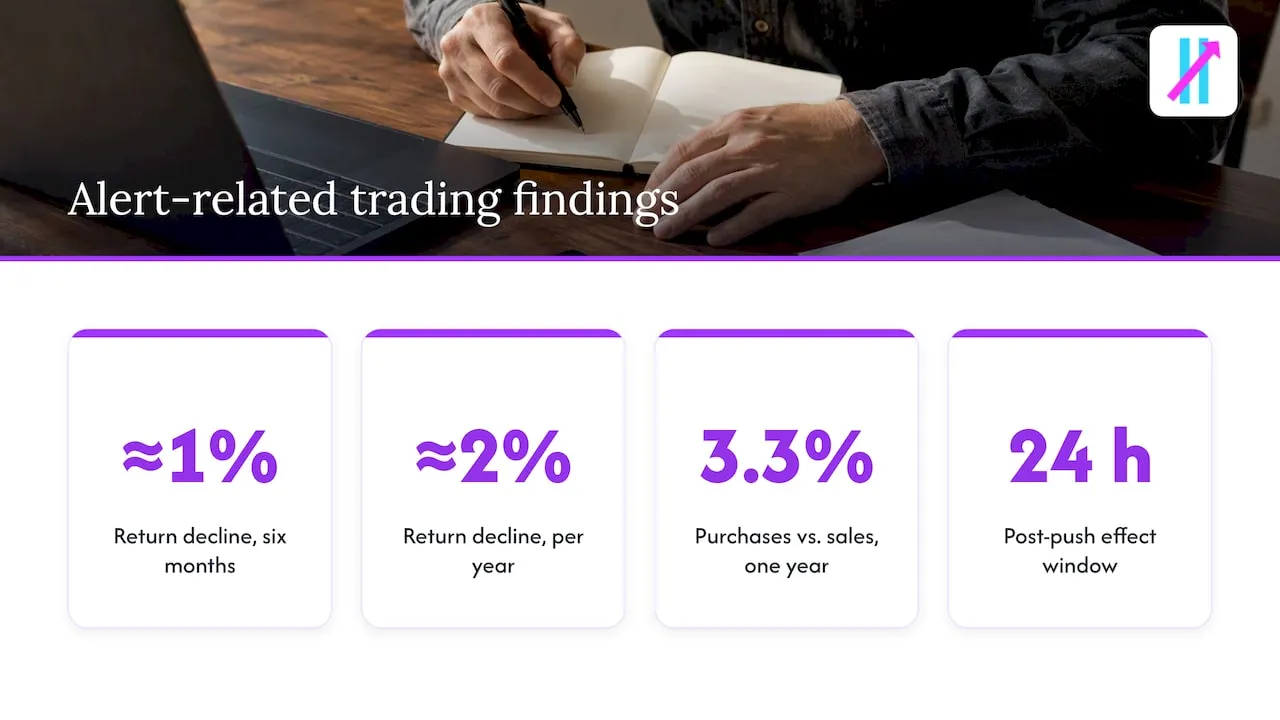
A 2023 study summarized by CNBC found that people who used price-tracking alerts tended to trade more and underperform non-users, with the authors linking the pattern to overconfidence and financial illiteracy. That is a correlation in a retail sample, not proof that an alert causes a loss, but the direction matters.
Price-tracking alert users saw investment performance decline by about 1% in six months, roughly 2% per year, and they traded more than non-users. The cost of constant pings shows up in results, not just in annoyance.
The mechanism is attention. A working-paper presentation on attention triggers found that push notifications increase trading intensity, leverage and risk taking in the 24 hours after receipt, with larger effects for younger and less-experienced investors. A notification pulls you toward a trade you did not plan to make.
Why does that happen? A push alert invites fast, automatic judgment instead of the slower reasoning a plan requires. Research on fast-thinking attention found that push notifications can exacerbate the disposition effect, the habit of selling winners too early and holding losers too long, and that this harms investor outcomes.
Overconfidence feeds the loop. Research asking whether investors trade too much reported that purchases underperformed sales by an average of 3.3% over one year in discount-broker samples. An alert that fires constantly gives you the feeling of being informed, and that feeling fuels more trades.
The fix is not to abandon alerts. It is to treat them like a scarce resource, spend them on high-conviction events, and build a structure that keeps a ping from becoming a trade by reflex.
How do you design a tiered alert system for traders?
A tiered system sorts every alert by how fast you must act and routes it to a channel that matches. The idea mirrors how monitoring teams classify events, and it works for a trading desk of one.
Tier 1, informational. Nothing requires action. These land on a dashboard or in a daily digest. Examples: price crossing a watchlist level, a moving average cross on a higher timeframe you only review, volume rising on a symbol you track.
Tier 2, warning. A setup is forming and needs review promptly. These go to email or a quiet notification channel. Examples: price approaching a planned entry zone, or two of your three confluence conditions met.
Tier 3, critical. A validated entry or exit condition has completed. These alone reach push or automation. Examples: a backtested entry signal confirmed at bar close, or a stop level breached on an open position.
Rules that keep the tiers honest:
- Promote by conviction, not by excitement. A signal reaches critical only if it matches a rule you have tested.
- Compress the lower tiers. Bundle informational items into one digest per session and keep only the latest state for each symbol.
- Expire stale alerts. A warning that sits unread for four hours should be dropped, not re-sent.
- Write critical payloads like orders. Include the symbol, timeframe, direction, conviction level, suggested action and invalidation level, so you decide in seconds without opening five charts.
A critical alert template might read: “BTCUSD 1h, long setup, 3 of 3 conditions met, enter on next bar open, invalidate below the prior swing low.” Short, specific and actionable beats a bare price ping every time.
Pro Tip: Start with a limited set of critical alert types. Add another only after you have logged enough results from the first set.
How do you configure TradingView to lower alert noise?
Most false urgency comes from alert conditions that fire mid-bar and then reverse. A few settings changes remove much of it.
- Prefer bar-close triggers. Alerts that fire only when a bar closes avoid signals that appear and vanish. Our guide to bar-close TradingView alerts explains how this protects you from repaint losses.
- Combine conditions. Replace single-threshold price alerts with confluence alerts, for example trend direction plus momentum plus volume, so one noisy input cannot trigger a notification alone.
- Customize the message. Put the symbol, timeframe, action and invalidation level in the alert text, along with a pointer to your response checklist.
- Route with webhooks. Send critical alerts to push or automation and lower tiers to email, Slack or a digest service. Our walkthrough on setting up TradingView indicator alerts covers the mechanics.
- Review what a signal is. If you are unsure which events deserve an alert, our primer on what a trading signal is describes what makes one actionable.
Traders who want broader context beyond alerts can look at BitPulse, which offers probabilistic Bitcoin projections, alerts and decision logging. It can serve as a second view when you want multi-horizon context before acting on a critical signal.
How do you measure alert latency and verify delivery?
An alert you cannot trust is worse than no alert, because you either miss moves or chase stale ones. Testing helps remove guesswork.
You can measure TradingView alert latency using the protocol below. Median matters more than the best case, because one fast delivery tells you nothing about the slow ones that cost you entries.
For a swing strategy, latency may be less relevant, but for fast intraday entries you should know your own number before relying on push delivery.
A simple test protocol:
- Send. Fire test alerts across your channels at different times of day.
- Timestamp. Record when each alert was triggered and when it arrived, then take the median.
- Dry-run. Walk through your response checklist on a few test alerts as if they were real.
- Log failures. Note any missed, delayed or duplicated alerts and which channel caused them.
- Set a threshold. Decide the maximum delay your strategy tolerates, and rate each channel against it.
If delivery is inconsistent, reduce your dependence on push. Add a second route for critical alerts, widen your entry windows, or move the affected strategy to automated execution so the human delay disappears.
When should you automate execution instead of relying on alerts?
Alerts keep you in the loop, and that is both their value and their cost. The right choice depends on your rules and your behavior.
Automation fits when your rules are consistent and backtested, when the strategy is sensitive to latency, or when you repeatedly act impulsively on alerts. Alerts fit when your approach is discretionary, when you need human judgment on unusual or low-frequency setups, or when each trade needs context a rule cannot capture. Many traders land on a hybrid: alerts for discovery, automation for routine setups.
Our post on alerts versus automation lays out a test, and the broader benefits of automated trade signals show how structured signals reduce decision noise. To transition safely:
- Run in parallel for a trial period. Keep trading manually while automation runs on paper or at small size.
- Log everything. Record every signal, fill and deviation between the two.
- Write a rollback plan. Define the exact conditions under which you switch back to manual control.
Pro Tip: Automate your most boring, most repeatable setup first. If you cannot describe it clearly, it is not ready to automate.
How do you turn an alert into a disciplined workflow?
An alert should start a process, not a reaction. When a critical alert arrives, follow the same process every time:
- Verify. Confirm the alert is real and current, not a duplicate or a stale message.
- Contextualize. Check the higher timeframe and any scheduled news.
- Confirm. Make sure every condition in your written setup is met.
- Size. Calculate position size from your stop level and risk limit.
- Execute. Place the order with the stop attached, or skip it and log why.
Pair the checklist with a response template: “Alert received, timeframe confirmed, risk set at the planned limit, stop at the invalidation level.” If you cannot fill in every blank, you do not trade.
Log each alert and the action you took. A short weekly review quickly shows which alerts lead to your best trades and which lead to regret. Add behavioral guardrails too: commit to rules before the session starts, share your log with an accountability partner, and keep quiet-hour rules even when the market is moving.
Why is trading attention a limited resource?
Attention behaves like capital: spend it everywhere and you have nothing left for the trades that matter. The traders I respect treat their alert capacity the way a portfolio manager treats a risk budget, with a hard cap and a bias toward high conviction.
I run the tiered system and the latency tests in my own trading, and the biggest change was how few alerts I now need. Fewer pings did not mean fewer opportunities. It meant clearer decisions. Change one thing this week, measure it, and keep only what improves your results.
— Steven Hartwell
How does Big Move Algo help reduce alert fatigue?
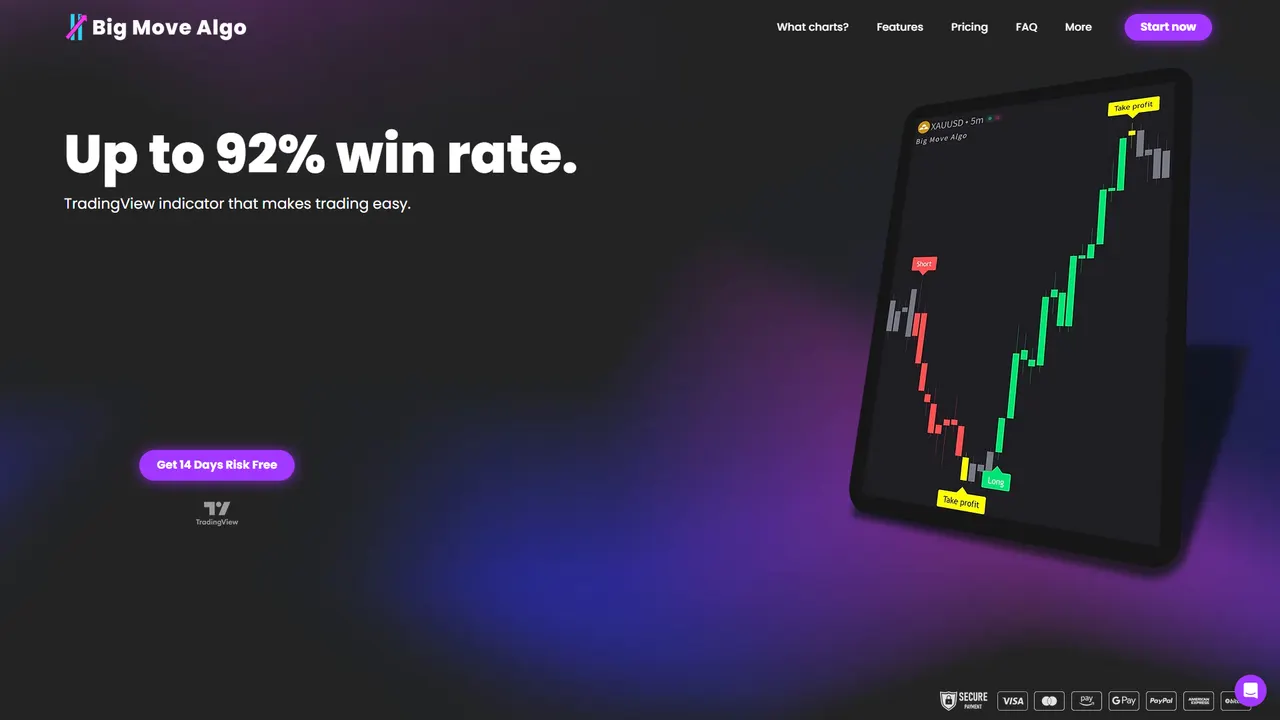
Every tactic above comes down to getting fewer, better signals. That is the problem we built Big Move Algo to solve: a TradingView indicator that turns market analysis into clear Long, Short and Exit signals instead of a stream of price pings.
Here is how it maps to the checklist:
- Structured signals. Long, Short and Exit calls give you a defined decision, which supports your critical tier.
- AUTO Mode. Minimal setup means you start with sensible defaults instead of building dozens of alerts.
- Fake Trend Detector. It filters out low-quality market conditions, cutting the false triggers that fuel overload.
- Unlimited devices. Alerts reach multiple platforms, so you can route critical signals where you will see them.
You can test it with the same protocol from this guide: send alerts, timestamp them, run your response checklist and log the results over two weeks. Plans are listed on our product page, where you can pick the one that fits and start testing today.
FAQ
What is alert fatigue in trading?
Alert fatigue is the loss of focus and judgment that comes from too many notifications. You start ignoring alerts or reacting to them out of habit, which leads to missed setups and impulsive trades.
How can I reduce trading notification overload quickly?
Cut your alerts to those tied to a specific decision, then route only critical signals to push. Move everything else to a dashboard or daily digest and set quiet hours.
Do price alerts hurt trading performance?
A 2023 study summarized by CNBC found that price-tracking alert users saw a performance decline of about 1% in six months. The finding is a correlation, and design and behavior matter.
Should I use alerts or automation?
Use automation for consistent, backtested rules or if alerts keep triggering impulsive trades. Keep alerts for discretionary setups that need human judgment.
How do I know if my alerts are delivered on time?
Send test alerts, timestamp each one and compare the median delay with what your strategy tolerates. Repeat the test whenever you change channels or platforms.
Sources
- Like getting price-tracking alerts? Why you should be careful
- Attention Triggers and Retail Investors’ Risk Taking
- Fast-Thinking Attention and the Disposition Effect