StockSharp.com Alternatives for U.S. Traders in 2026

The best StockSharp alternative depends on whether you want to write trading software or trade with it. If you are a C# developer, a broker-connected platform such as NinjaTrader, Interactive Brokers or an Alpaca API setup is the closest match. If you are a retail trader who wants clear Long, Short and Exit signals without servers or code, a TradingView indicator like Big Move Algo is the simpler route. Below we compare both paths, with costs, trade-offs and the questions to ask before you commit.
TL;DR
- StockSharp is a free, open source framework for building trading robots. It is powerful, but you supply the code, the data feeds and the maintenance.
- For developers, Alpaca, NinjaTrader and Interactive Brokers are the usual brokerage-integrated alternatives for U.S. traders.
- For traders who want signals rather than a toolkit, Big Move Algo runs inside TradingView with AUTO Mode, a Fake Trend Detector and plans from $55 per month.
- TradingView sends alerts, not orders. Hands-off automation needs a relay service or a platform with native execution.
- No tool removes risk. The SEC and FINRA warn against promises of guaranteed returns.
Table of Contents
- What StockSharp is, and why people look elsewhere
- The execution gap: the question that sorts every option
- Alternatives for developers and systematic traders
- Alternatives for traders who want signals, not code
- Side-by-side comparison
- How to choose: five criteria that matter
- Our perspective
- Big Move Algo plans and pricing
- Red flags to avoid with any trading software
- FAQ
- Sources
What StockSharp is, and why people look elsewhere
StockSharp describes itself on GitHub as an open source platform for developing trading robots across stocks, forex, crypto and options. It is built in C#, and the code is available under an Apache-2.0 license. That is a real strength: total control, no subscription, and connectors to many markets.
The cost shows up elsewhere. AlgoDrill points to an “infrastructure tax”: servers, data feeds and bug fixes that a managed subscription spares you. For a developer who enjoys that work, it is a fair trade. For a trader who mostly wants to know when to enter and exit, it is often a poor one.
People usually search for alternatives for one of three reasons:
- They do not write C#. They want a visual or no-code option.
- They want a broker-native setup. They would rather have one provider handle data, routing and support.
- They want signals, not a framework. They already chart on TradingView and want a tool that reads the market for them.
Those are three different buyers, so the alternatives below are grouped the same way.
The execution gap: the question that sorts every option
Before comparing names, understand one distinction. AlgoDrill calls it the “execution gap”: beginners tend to want visual indicators for signal generation, while systematic traders want platforms wired directly into brokerage routing to limit slippage and latency.
In practice, platforms are either native or webhook-based. A native platform sends orders straight to your broker connection. A webhook platform emits an alert that something else must turn into an order. Most beginners wrongly assume TradingView places trades itself. It sends alerts, not orders. To go fully hands-off, you add a relay such as TradersPost or PineConnector, or you pick a platform with native execution such as NinjaTrader or Interactive Brokers’ TWS.
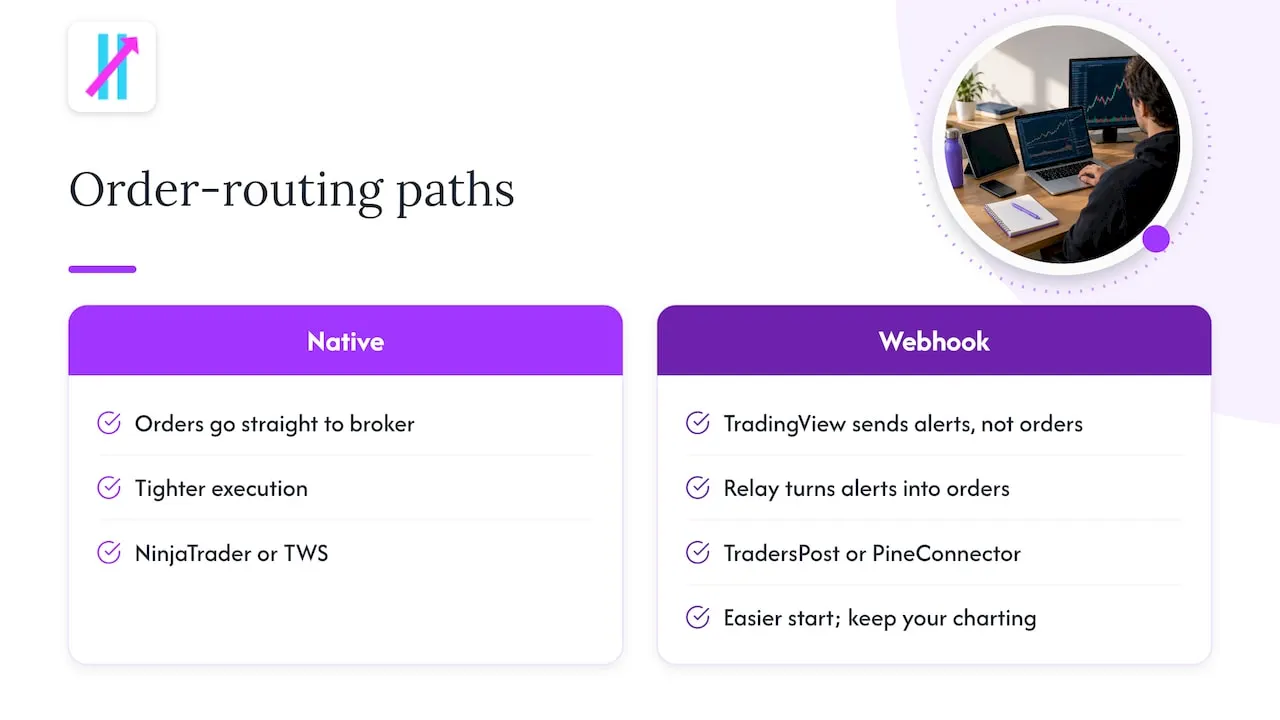
Neither design is wrong. Native is tighter. Alert-based is easier to start and keeps your charting where you already work.
Alternatives for developers and systematic traders
If you chose StockSharp because you want to build and own your logic, these are the closest substitutes.
Alpaca
BrokerChooser names Alpaca the best broker for algorithmic trading in the United States in 2026, citing a developer-friendly API and low fees. It offers $0 commission on stocks and ETFs. It fits coders who want to write strategies in a modern language and route orders through a documented API.
NinjaTrader
NinjaTrader is the standard pick for futures-focused algorithmic execution, per the same BrokerChooser review. It is widely used for futures and has both free and paid licensing tiers. It suits traders who want a desktop platform with built-in strategy tools rather than a raw framework.
Interactive Brokers
Interactive Brokers is the multi-asset, global-scale choice and has its own robust API. It is a good home for traders who want one account across many markets and are comfortable with a more technical environment.
TradeStation
TradeStation is another name that comes up in rankings. One 2026 roundup describes it as a desktop platform built for active trading across stocks, options and futures.
Chart-based automation tools
Other tools, including ProRealTime, Sierra Chart and AmiBroker, appear in a 2026 custom trading software ranking. The ranking pitches ProRealTime for chart-based automation with integrated testing and live execution, and Sierra Chart for deep chart-linked automation and traceable order activity.
Alternatives for traders who want signals, not code
This is where Big Move Algo sits. It is a proprietary TradingView indicator that analyzes markets in real time and prints Long, Short and Exit signals. It is not a framework, and it does not ask you to maintain anything.
What Big Move Algo gives you
- AUTO Mode for a fast start with minimal setup, and Manual Mode when you want more customization.
- A Fake Trend Detector that flags low-quality or misleading conditions where trading may not be recommended.
- Coverage across crypto, forex, stocks, indices and commodities.
- Alerts delivered to multiple platforms, plus integration with automated trading platforms.
- Support for unlimited devices, instant access after purchase, and free updates.
- A no-repainting design, which matters if you judge a signal by what it showed at the time.
The trade-off is plain: you give up the total control of writing your own code. In return you skip the servers, the data feeds and the debugging, and you stay in the charting environment you already know. If your goal is to move from guesswork to a structured routine, that is often the better exchange.
Connecting signals to a broker
Because TradingView emits alerts, you decide how much to automate. Many traders start by acting on alerts manually. Others route them to a bot. We have written guides on sending TradingView alerts to a bot without duplicate trades and on the components needed to connect TradingView to a bot. If you are unsure whether to automate at all, our alerts versus automation test plan walks through a 2 to 4 week trial.
Side-by-side comparison
Costs below reflect what the sources state or what we publish. Verify current pricing at each provider before you commit.
| Option | Best for | Execution | Skill needed | Cost notes |
|---|---|---|---|---|
| StockSharp | Developers building custom robots | Native connectors, you build and host | C# programming | Free, open source; you pay for infrastructure |
| Alpaca | Coders wanting an API-first broker | Native via API | Programming | $0 commission on stocks and ETFs |
| NinjaTrader | Futures-focused automation | Native | Moderate | Free and paid licensing tiers |
| Interactive Brokers | Multi-asset, global accounts | Native via TWS or API | Moderate to high | Per broker’s fee schedule |
| Big Move Algo | Retail traders wanting clear signals in TradingView | Alerts, optional relay to a broker | None required | $55 to $79 per month, see plans below |
How to choose: five criteria that matter
1. Do you want to build or to trade?
Be honest about your hours. A framework rewards people who enjoy engineering. If your edge is reading charts and managing risk, spending evenings on code is a hidden cost.
2. Where does the order actually get placed?
BrokerChooser’s view is that the best choice for an algorithmic trader is rarely just software. It is a broker and platform pairing with documented API keys, stable historical data and regulatory oversight. It also advises favoring brokers with a clean regulatory record over those with the flashiest dashboard. If you are weighing that pairing, this overview of choosing a broker and platform combination is a helpful starting point, and you can test your fills, not your ping once you have a shortlist.
3. What will it cost in total?
A free framework is not free once you add hosting and data. A subscription is not cheap if you never use it. Add up the full monthly picture for each path.
4. How will you handle margin and day trading rules?
If you trade stocks intraday, the rules changed. FINRA says it has replaced the pattern day trader rule with a risk-based intraday margin standard, and that there is no $25,000 minimum equity requirement for day trading. Your firm instead monitors your equity relative to your exposure during the day. Your broker’s own house rules may still be stricter than FINRA’s floor, so ask your broker before you size positions.
5. What guardrails exist if a signal is wrong?
Signals fail sometimes. Define your stop, your position size and a daily loss limit before the first trade. Our guide to automated trading risk controls for TradingView users covers this in detail, and the piece on rule-driven confirmation versus anticipation shows how to size risk at 1 to 2%.
Our perspective
We build Big Move Algo for people who feel buried by indicators. Most retail traders we hear from do not lack data. They lack a clear rule for when to act and when to stand aside. That is why we put the Fake Trend Detector next to the signals: sometimes the right call is not to trade.
We also do not think a signal tool replaces a strategy. It is an assistant. Regulators say the same about automation in general, and FINRA’s intraday margin guidance points traders toward understanding their actual exposure. A tool that prints Long, Short and Exit helps you act consistently, but you still own your position size and your stop.
If you can write C# and want to own every layer, StockSharp and the broker-native platforms above are good at what they do. If you want to be trading this week, in a chart you already use, with minimal setup, that is the gap we aim to fill.
— Steven Hartwell
Big Move Algo plans and pricing
Access is sold by subscription, paid through Stripe, with instant access after purchase. Plans as published on our site:
| Plan | Monthly | Annual |
|---|---|---|
| Version 2 | $55 per month | $660 per year |
| Version 3 | $64 per month | $768 per year |
| Version 3 Plus | $79 per month | $948 per year |
If you already use TradingView, you can change the TradingView account tied to your access when needed. New to platforms in general? Start with our first trading platform checklist.
Red flags to avoid with any trading software
The SEC, NASAA and FINRA treat promises of guaranteed returns, high win rates or “AI” performance as major red flags. The SEC notes that bots are not money machines and that you should confirm any platform or signal provider is appropriately registered. Be wary of anyone who pushes you to deposit more money by phone, and of any vendor who will not discuss losing trades.
We make no profit promises. Treat any tool, ours included, as something to test on small size first.
FAQ
Is StockSharp really free?
The code is open source under an Apache-2.0 license, per its GitHub page. You still pay for what surrounds it: servers, market data and your own development time. Check your data and broker costs before calling it free.
Does TradingView place trades for me?
No. TradingView sends alerts, not orders. To automate, you need a relay service or a platform with native execution. Many traders begin by acting on alerts manually while they test.
What is the best StockSharp alternative for a beginner?
A beginner who does not code usually does better with a visual, signal-based tool than with a framework. Big Move Algo’s AUTO Mode is built for a quick start, and Manual Mode is there once you want more control. Whichever you choose, test on small size first.
Do I still need $25,000 to day trade stocks?
FINRA says the $25,000 minimum no longer applies under the new intraday margin standard. Your broker may set stricter house requirements, so confirm with them directly before you start.
Sources
- Best Brokers for Algorithmic Trading in the United States, BrokerChooser
- Best Algo Trading Platforms Compared, AlgoDrill
- StockSharp on GitHub
- Understanding the New Intraday Margin Requirements, FINRA
- Investor Alert: Binary Options and Fraud, SEC
- 10 Best Trading Software Providers, Snap Innovations
- Top 10 Best Custom Trading Software, WorldMetrics